| Author |
Message |
 |
|
|
|
|
Advert
|
Forum adverts like this one are shown to any user who is not logged in. Join us by filling out a tiny 3 field form and you will get your own, free, dakka user account which gives a good range of benefits to you:
- No adverts like this in the forums anymore.
- Times and dates in your local timezone.
- Full tracking of what you have read so you can skip to your first unread post, easily see what has changed since you last logged in, and easily see what is new at a glance.
- Email notifications for threads you want to watch closely.
- Being a part of the oldest wargaming community on the net.
If you are already a member then feel free to login now. |
|
 |
2012/02/13 19:32:33
Subject: In need of computer help
|
|

Infiltrating Hawwa'
Through the looking glass
|
Alright guys, my desktop recently died on me. It shut down just fine, but then the next day it starts up to a blank screen and some beeps. After some investigation, here's what I've found out.
- The beep sounds like one long one and 2 short ones. I believe the problem is video card related.
- I've take out the video card and put it back in, still no display.
- I've taken out the power cable from the video card, which made the scream noise, and put it back in, so it's not power.
- I've put my video card in a friends computer and it worked. I put his video card in my computer and it worked. My video card does not work in my computer.
- I've tried a different slot, same result.
- I've tried taking out the RAM and putting it back in. Same result.
So what do? I'm running a nvidia 8800 gtx alpha dog card. It's in need of an upgrade for sure, and I planned to do just that soon. However, what's odd to me is that the card works in my friends computer but not mine. A computer buddy of his said it might have something to do with the drivers, which I updated a few months ago I believe.
|
“Sometimes I can hear my bones straining under the weight of all the lives I'm not living.”
― Jonathan Safran Foer |
|
|
 |
|
2012/02/13 19:37:22
Subject: Re:In need of computer help
|
|
Kid_Kyoto
|
If you're getting a POST-error beep (rhetorical, you are), then it has nothing to do with drivers. While I know you don't think it's power, the first thing that comes to mind for me is power. Can you grab your friend's power supply and try it with your video card in your computer? What kind of video card does your friend have? What kind of power inputs does your card take? Does his take the same kind?
|
|
|
|
|
|
2012/02/13 19:41:12
Subject: In need of computer help
|
|
Infiltrating Hawwa'
Through the looking glass
|
Oh forgot to add that the computer makes the same noise regardless of if I have the video card in it or not, if that changes anything. Fetching the information you requested in the mean time.
|
“Sometimes I can hear my bones straining under the weight of all the lives I'm not living.”
― Jonathan Safran Foer |
|
|
|
|
2012/02/13 19:44:42
Subject: In need of computer help
|
|

Lone Wolf Sentinel Pilot
Southampton, Hampshire, England, British Isles, Europe, Earth, Sol, Sector 001
|
Unlikely its the GC, mine is an old G-force2 Ti GTS Pro and it still ticks along. And as you have said that you have tested it on your mats PC and it works there must be a bios clash some where. If its not even passing the post test it an't the drivers thats the problem.
Find your motherbord book and look up how to rest the CMOS. This will reset the BIOS to factory defult that negating any IRQ designations.
9 times out of 10 the jumper to short out the CMOS is right by the battery that is on the bord. But check your motherbord book first.
Oh and god luck 
|
|
|
|
|
|
2012/02/13 19:45:08
Subject: Re:In need of computer help
|
|
Infiltrating Hawwa'
Through the looking glass
|
Alrighty, this is the kind of power cable mine takes, as well as his.
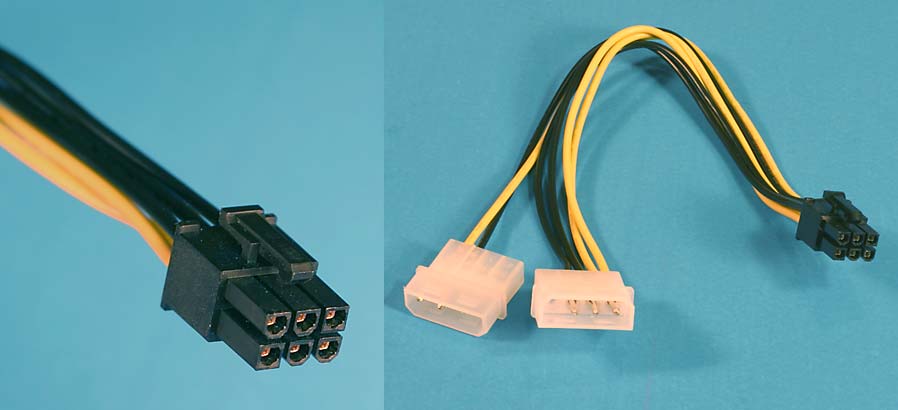
The thing is, the video card makes a completely different noise when you take the power cable out than it would if you leave it in.
|
“Sometimes I can hear my bones straining under the weight of all the lives I'm not living.”
― Jonathan Safran Foer |
|
|
|
|
2012/02/13 19:45:47
Subject: Re:In need of computer help
|
|
Kid_Kyoto
|
Sounds good. Beep codes vary depending upon the BIOS manufacturer, but one long two short corresponds with Award's "Video Issue" beep, so it sounds like there is certainly something afoot with the video.
Did you change anything recently? Anything out of the ordinary happen? Any other new components?
Automatically Appended Next Post:
Do you have the molex to 6-pin adapter (as in the right hand one), or is yours built in to the cable (like on the left)?
|
|
This message was edited 1 time. Last update was at 2012/02/13 19:47:23
|
|
|
|
|
2012/02/13 19:50:27
Subject: In need of computer help
|
|
Lone Wolf Sentinel Pilot
Southampton, Hampshire, England, British Isles, Europe, Earth, Sol, Sector 001
|
Just read the above post. You'll have to do a (for lack of a better word) root cannal on it.
Take every thing off the bord, HDs, the DVD player, the RAM sticks, the GC and the SC (sound card).
Once all you have left is the mother bord and the PSU turn it on an note the type of beep you get, it should be like a morse code noise, its telling you that it can't find any RAM. Then turn it off and add the next bit of hardware. this will let you know what if any thing is corsing the drain.
|
|
|
|
|
|
2012/02/13 19:51:20
Subject: In need of computer help
|
|
Infiltrating Hawwa'
Through the looking glass
|
I've changed nothing recently, nor have I added any new hardware. It's done this before, quite a few months ago. I remember taking out the video card, putting it back in, and then it started working again.
Mines built in.
Also here is the mobo
http://www.tigerdirect.com/applications/SearchTools/item-details.asp?EdpNo=3528165&CatId=3495
@Ribon
I'm looking into your suggestion, anything bad about resetting things? I'm decent with general computer maintenance, but I'm mighty stupid working with POST, CMOS, and all that good stuff.
|
“Sometimes I can hear my bones straining under the weight of all the lives I'm not living.”
― Jonathan Safran Foer |
|
|
|
|
2012/02/13 19:58:00
Subject: In need of computer help
|
|
Longtime Dakkanaut
Beaver Dam, WI
|
The odd duck in this is that your friend's video card works in your PC. Otherwise I would be suspecting something wrong with your motherboard. Does your motherboard have a built-in (cheap) video? Does it work without a video card in it at all? Otherwise you need to see what version of BIOS you have - it should be one of the first things to pop up on boot. At that point, I would go to the BIOS manufacturer site and look for the version of BIOS and see what the one long two short beep code means. That is going to be the place to start.
|
|
|
|
|
|
2012/02/13 19:58:59
Subject: In need of computer help
|
|
Lone Wolf Sentinel Pilot
Southampton, Hampshire, England, British Isles, Europe, Earth, Sol, Sector 001
|
Nothing bad will happen, it will just run like a bag of bolts in windows, but thats what its for, you may have use a GC tweeker programme and they are notirouse for buggering up things. Then once the BIOS is reset and asumming it worked you just look for the diffent settings that you have in there, oh and don't touch any thing to do with ram rates, CPU core voltages and other stuff that looks like it could do some damage (becouse trust me overclocking a CPU is fun but it don't' af: brun the chip out, did that to an old AMD Duron) Here is a link to a sight that explains what the CMOS and the BIOS does http://www.computorcompanion.com/LPMArticle.asp?ID=76
|
|
This message was edited 1 time. Last update was at 2012/02/13 20:04:01
|
|
|
|
|
2012/02/13 20:06:33
Subject: In need of computer help
|
|
Infiltrating Hawwa'
Through the looking glass
|
DAaddict wrote:The odd duck in this is that your friend's video card works in your PC.
Yeah, that's the part that still blows my mind. That and how mine works in his. The mobo has no built in video (this is the first time I've ever seen a real use for it!), and that's what going to make looking at any sort of a stats tricky. Access to my friends card is rather unavailable right now, so all I've got to work with is a tower that's not sending anything to the monitor.
@Ribon
I'm having issues locating any sort of BIOS info. I'm looking up specs on the mobo, but nothing I'm seeing talks about what kind of bios it uses.
|
“Sometimes I can hear my bones straining under the weight of all the lives I'm not living.”
― Jonathan Safran Foer |
|
|
|
|
2012/02/13 20:19:25
Subject: In need of computer help
|
|
Purposeful Hammerhead Pilot
|
What wattage is your and your friend's power supply? Is it adequate, giving for - 10% error in wattage (I'm assuming it's not a new power supply), to run your entire system (and does your friend's video card have a different power requirement)? Does your video card have a fan-based heat sink, if yes, is it obstructed/dusty/working?
|
 - 3000 - 3000
 - 145 - 145 |
|
|
|
|
2012/02/13 20:19:43
Subject: In need of computer help
|
|
Lone Wolf Sentinel Pilot
Southampton, Hampshire, England, British Isles, Europe, Earth, Sol, Sector 001
|
Okay, looking at the site you say is your bord I've pulled this pic  Get your self a light and maybe a long tweser set and get ready to get you self right in your case. Now you see where it says motherbord battery. Thats the CMOS battery maybe about half an inch from that you will find a jumpper. it will probably say some thing like CMOS gate or jummper. Note how it is sitting, there should be a pin on the jumper unit that the little plastic jumper isn't on, that will short the conection of the CMOS to the battery. To short it you remove the jumper from its closed position and place it over the pin that wasn't covered and the middle pin. count to ten (or five, your choise) then put the jumper back to its original two pins. Only do this if you tried all other bits of advice, as i had a freind whos system whent abit dolally and he was a bit heavy handed with it, now he has a grands worth of paper wieght sitting on his desk. So go softly and try not to annoy the mechien sperit to much with your poking and proding
|
|
This message was edited 2 times. Last update was at 2012/02/13 20:24:34
|
|
|
|
|
2012/02/13 20:35:10
Subject: In need of computer help
|
|
Infiltrating Hawwa'
Through the looking glass
|
Shrike325 wrote:What wattage is your and your friend's power supply? Is it adequate, giving for - 10% error in wattage (I'm assuming it's not a new power supply), to run your entire system (and does your friend's video card have a different power requirement)? Does your video card have a fan-based heat sink, if yes, is it obstructed/dusty/working?
having issues locating a screwdriver to pop the power source out, but i believe it was mid 400's (if that's even the correct way to label power supplies). All the fans are running, no blockage (I have a huge tower), nothing at all changed from the night it was working to the afternoon that it wasn't. It's been running fine for like 3-4 years now...(edit) except the one time it did this before and I managed to get it back to working.
|
|
This message was edited 1 time. Last update was at 2012/02/13 20:44:26
“Sometimes I can hear my bones straining under the weight of all the lives I'm not living.”
― Jonathan Safran Foer |
|
|
|
|
2012/02/13 20:46:14
Subject: In need of computer help
|
|
Purposeful Hammerhead Pilot
|
Power supplies, unfortunately, degrade over time. And, the closer you are to their rated wattage, the faster it will decay. Following that up, a 450 is a bit low these days if you're talking modern components (650+ is what I would recommend if you were building today). It may not be your problem, but I wouldn't necessarily rule it out.
|
- 3000
- 145 |
|
|
|
|
2012/02/13 20:49:42
Subject: In need of computer help
|
|
Infiltrating Hawwa'
Through the looking glass
|
Shrike325 wrote:Power supplies, unfortunately, degrade over time. And, the closer you are to their rated wattage, the faster it will decay. Following that up, a 450 is a bit low these days if you're talking modern components (650+ is what I would recommend if you were building today). It may not be your problem, but I wouldn't necessarily rule it out.
Well, remember though his card worked in my computer, and he's running a Geforce GTX 570 and that works fine. If the power supply was an issue, wouldn't the beefier card have issues too?
|
“Sometimes I can hear my bones straining under the weight of all the lives I'm not living.”
― Jonathan Safran Foer |
|
|
|
|
2012/02/13 20:53:05
Subject: Re:In need of computer help
|
|
Kid_Kyoto
|
The reason why I think it's power as well is because most of the time the alarm for voltage is just that: an alarm for voltage. It won't really cover it if you're under the suspected amount of wattage. Automatically Appended Next Post: Necroshea wrote:Shrike325 wrote:Power supplies, unfortunately, degrade over time. And, the closer you are to their rated wattage, the faster it will decay. Following that up, a 450 is a bit low these days if you're talking modern components (650+ is what I would recommend if you were building today). It may not be your problem, but I wouldn't necessarily rule it out.
Well, remember though his card worked in my computer, and he's running a Geforce GTX 570 and that works fine. If the power supply was an issue, wouldn't the beefier card have issues too?
Just because something is faster, doesn't make it consume more electricity. Compare early generation P4s with Core 2 Duos
|
|
This message was edited 1 time. Last update was at 2012/02/13 20:54:02
|
|
|
|
|
2012/02/13 20:54:04
Subject: In need of computer help
|
|
Lone Wolf Sentinel Pilot
Southampton, Hampshire, England, British Isles, Europe, Earth, Sol, Sector 001
|
Yes and no, newer cards do suck up the power but they are more efficent at it.
|
|
|
|
|
|
2012/02/13 20:57:21
Subject: In need of computer help
|
|
Infiltrating Hawwa'
Through the looking glass
|
Okay, so when I take the power cable out of my computer it makes a whining sound when I power the computer up. When I plug the power in it makes a completely different kind of sound.
How many different sounds are there relating to video cards? I'm still trying to find the manual to the mobo, no luck so far.
Automatically Appended Next Post:
Well, a bit of an update. I've got an led board on the mobo that shows codes and all that. Well I keep seeing an "FF", which is apparently infamous. I've read that some people flash the BIOS and things start working again, but im unsure.
Automatically Appended Next Post:
Yet another updated. I've watched it now, and when it's making the beep noise it's showing 92. I look up the code in the manual (which I found), and it just lists it as "Reserved".
Well that was a dead end.
|
|
This message was edited 2 times. Last update was at 2012/02/13 21:42:55
“Sometimes I can hear my bones straining under the weight of all the lives I'm not living.”
― Jonathan Safran Foer |
|
|
|
|
|
|


 2000
2000
 2000
2000
 WIP
WIP
 8000
8000