Switch Theme:

Thoughts on an airbrush issue please  [RSS] Share on facebook Share on Twitter Submit to Reddit
»
Author Message
Advert


Forum adverts like this one are shown to any user who is not logged in. Join us by filling out a tiny 3 field form and you will get your own, free, dakka user account which gives a good range of benefits to you:
  • No adverts like this in the forums anymore.
  • Times and dates in your local timezone.
  • Full tracking of what you have read so you can skip to your first unread post, easily see what has changed since you last logged in, and easily see what is new at a glance.
  • Email notifications for threads you want to watch closely.
  • Being a part of the oldest wargaming community on the net.
If you are already a member then feel free to login now.


Made in gb
Esteemed Veteran Space Marine


Northumberland

Hello all. With my degree 99.9% finished and quarantine, I've finally got around to starting to use my airbrush properly (I.E other than priming). And I'm having some good results on larger pieces. However, I'm struggling with a few bits that I hope I might get some advice on:

1. How do you more advanced airbrush artists manage gradients on small figures? My blends on a tank are pretty good and smooth, but as soon I transition to a small piece I find that, despite a 0.2 nozzle I just can't get pinstripe lines. I've tried a low pressure, milk-consistency paint and I ALWAYS clean my airbrush out thoroughly after each session - but even controlling the air/paint flow as fine as possible I vastly overshoot for such fine work. Am I just deluding myself that I can use an airbrush for such fine work, and need to go back to the brush?

2. Leading on from this; White - how the hell do you blend white at this scale? It's a speckling nightmare. High pressure, low pressure, clean airbrush, thinned just right - none of it seems to give me a smooth blend, even over a light grey. I've read around on various sites, but I feel I'm still missing some magic trick... (Btw, I thin it to milk consistency using a 1:3 mix of Vallejo Thinner:Water)

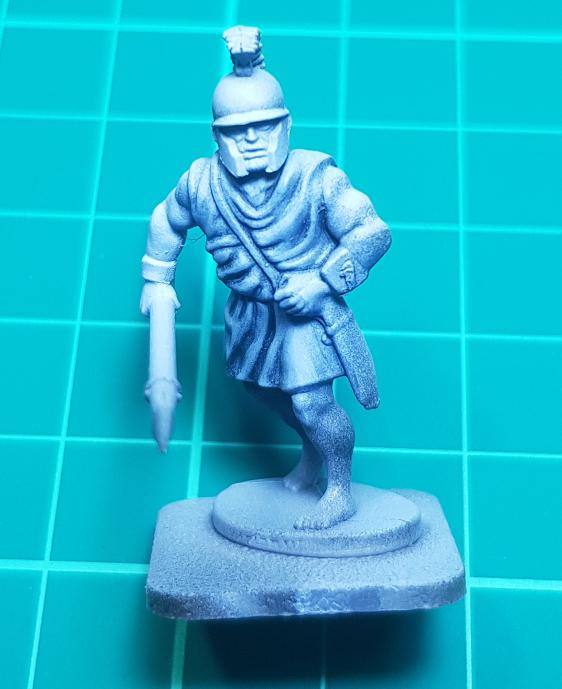
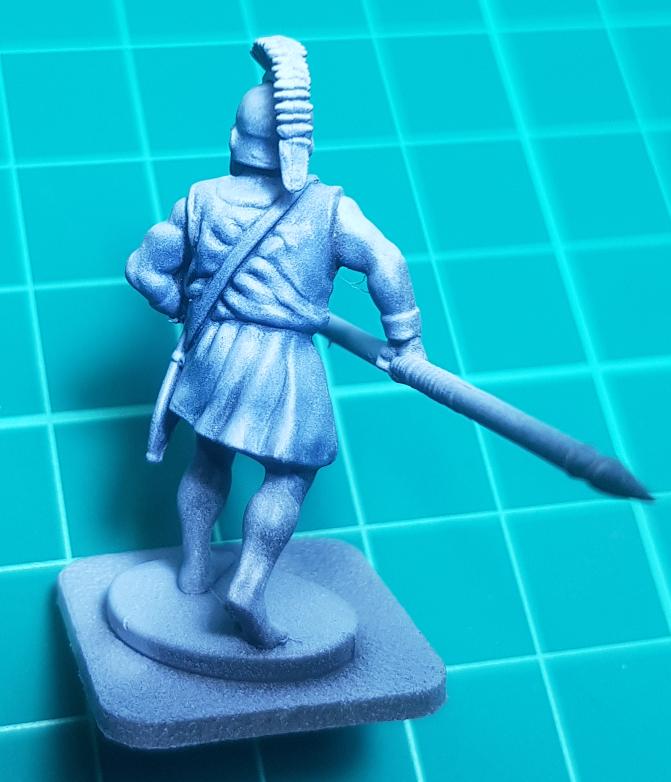
3. For reference, a dude - I was going for a pale bluey white, but in the end I just could not get the folds of his chiton to blend nicely. So I resorted to a wash, a zenithal highlght and some brush strokes along the folds. However, while it's a passable gaming standard, it's far too grainy for display quality. Any advice from experienced airbrushers on how you would have approached this?


Now with 100% more blog: 'Beyond the Wall'

Numine Et Arcu
 
   
Made in us
Wicked Canoptek Wraith


United States

First, make sure you have an oil-less air compressor with a tank. If you're using an air compressor without a tank you can get a spurting effect as it pumps air. You'll also want a moisture filter on the compressor.

If the tip of your needle or the nozzle that houses the needle is bent or scratched it can cause a grainy spray. Even a tiny bend on the very tip of the needle will do it.

The graininess can come from poor quality paint (I mainly use Vallejo), paint that's not mixed/shaken enough, or if your airbrush is getting "dry tip".
To avoid this, I just dip the tip of my airbrush in drying retarder or vallejo flow improver and spray air through it a couple times to remove excess. Then as I airbrush I keep an eye on the tip and clean it using a cotton swab as necessary. You'll see the paint building up on the tip.

I use Vallejo airbrush flow improver to thin my paints. I prefer it to thinner, but it's preference. You're always better off having paint that's too thin rather than paint that's too thick. You can always do an extra coat.

I almost always run my pressure between 20-25 PSI depending on the paint.

From your picture, if I had to guess, I would think that you're using a tankless compressor or your needle/nozzle is bent, scratched, or damaged. One other possibility is that your primer is grainy. When you prime the model, it should be smooth like silk. No specks.

This message was edited 1 time. Last update was at 2020/04/30 17:13:45


Forum Index » Painting & Modeling
Go to: