Switch Theme:

Preshading test c&c - Halo pelican  [RSS] Share on facebook Share on Twitter Submit to Reddit
»
Author Message
Advert


Forum adverts like this one are shown to any user who is not logged in. Join us by filling out a tiny 3 field form and you will get your own, free, dakka user account which gives a good range of benefits to you:
  • No adverts like this in the forums anymore.
  • Times and dates in your local timezone.
  • Full tracking of what you have read so you can skip to your first unread post, easily see what has changed since you last logged in, and easily see what is new at a glance.
  • Email notifications for threads you want to watch closely.
  • Being a part of the oldest wargaming community on the net.
If you are already a member then feel free to login now.


Made in gb
Leader of the Sept


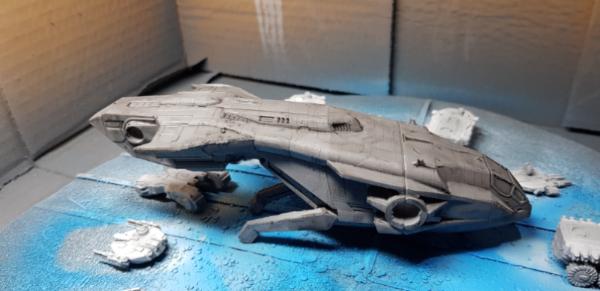
I watched some videos and I may have worked out how I was going wrong with my airbrush previously.

So I tried again with low.pressure and trying harder to get a decent consistency to my paint.

I went from this

To this
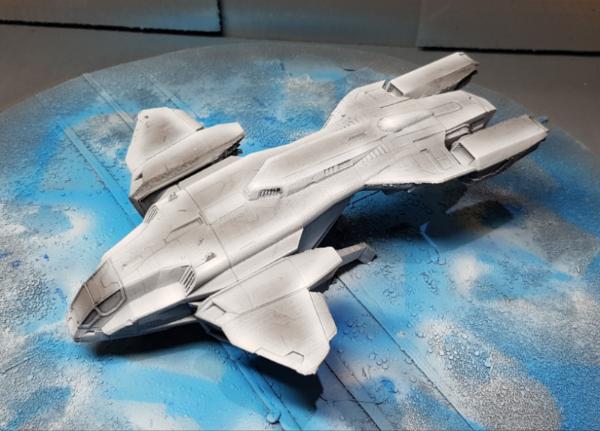


To this
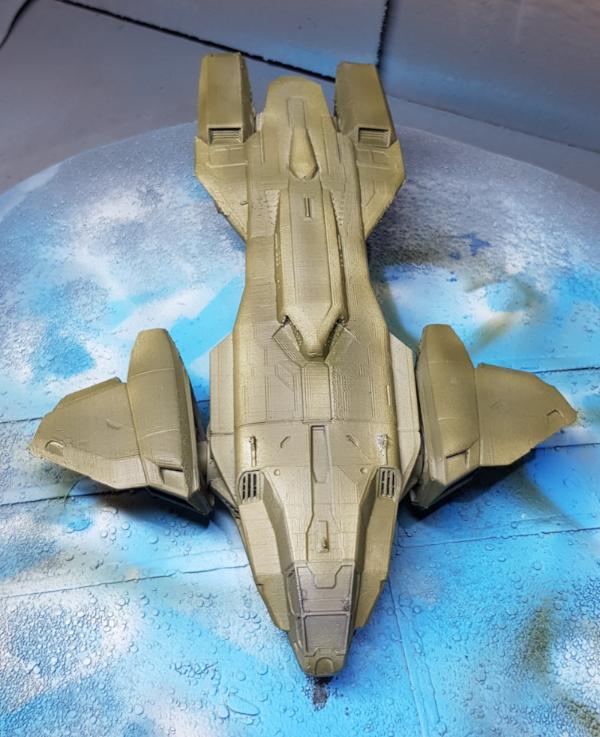

The effect looks maybe a bit subtle to.me. Did I put the green on too thick, or is this about the best you can expect from the technique without using inks or transparent media?

However I think i did ok with the grey up to white. Not award winning, but ok, or am I just deluding myself

Please excuse any spelling errors. I use a tablet frequently and software keyboards are a pain!

Terranwing - w3;d1;l1
51st Dunedinw2;d0;l0
Cadre Coronal Afterglow w1;d0;l0 
   
Made in gb
Thane of Dol Guldur


Bodt

What is the effect you're trying to achieve? I ask because normally on vehicles an airbrush would be used to pre shade on the panel lines, and you seem to have done the inverse. Not criticizing, just wondering what your process was. Did you follow a scheme or anything?

Paint wise it looks alright. Smooth with no pooled areas. Itooks quite subtle so you could go darker with the pre shade if you wished.

Heresy World Eaters/Emperors Children

Instagram: nagrakali_love_songs 
   
Made in gb
Leader of the Sept


Thanks for the feedback. I really love the effects you share with us all, so I appreciate it

The effect I was going for was highlights around edges of things basically. I have watched various videos and totally missed the.panel lines thing! I thought it was some kind of black magic that led to choice of shading...

Please excuse any spelling errors. I use a tablet frequently and software keyboards are a pain!

Terranwing - w3;d1;l1
51st Dunedinw2;d0;l0
Cadre Coronal Afterglow w1;d0;l0 
   
Made in ca
Regular Dakkanaut


Oh Canada!

If you want more obvious transitions, one option would be to basecoat in black or very dark grey, and push the highlights. Might have to also adjust the top coat to a brighter & lighter colour, as it has to be at least semi-transparent and will pick up more of the dark from the underpainting.

Personally though I think what you've got looks good. Subtle is a nice place to start, since you have room in both directions for additional shaded areas and highlights.
   
Made in au
Rookie Pilot


Melbourne, Australia

Your control looks ok. I think I know what you are trying to achieve. I too was at first underwhelmed by preshading. I'd go straight to highlighting the green as you did the grey. Go vibrant.


Forum Index » Painting & Modeling
Go to: