Switch Theme:

Black Templar Scout pants and such.. how do you do it?  [RSS] Share on facebook Share on Twitter Submit to Reddit
»
Author Message
Advert


Forum adverts like this one are shown to any user who is not logged in. Join us by filling out a tiny 3 field form and you will get your own, free, dakka user account which gives a good range of benefits to you:
  • No adverts like this in the forums anymore.
  • Times and dates in your local timezone.
  • Full tracking of what you have read so you can skip to your first unread post, easily see what has changed since you last logged in, and easily see what is new at a glance.
  • Email notifications for threads you want to watch closely.
  • Being a part of the oldest wargaming community on the net.
If you are already a member then feel free to login now.


Made in is
Thunderhawk Pilot Dropping From Orbit


Iceland

So recently I have been getting back into warhammer and although I have some techniques to paint black it doesn't seem to work on clothes. I've tried edge highlighting but it just looked silly, I also tried to paint them the same way I did my LOTR Ringwraith but it came out to blue-ish. I dont want to leave them in black because it looks way to flat.

So basically what I'm asking is, when painting black cloth/clothes, what is your personal technique?

Thanks for any answers in advance!

Gretar


Made in us
Masculine Male Wych


TN

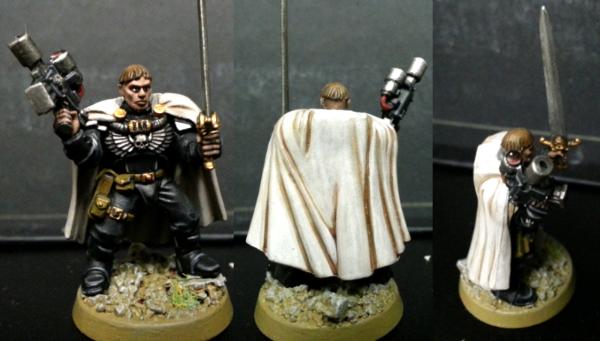
For the Black Templar Scout that I did, I painted the armor/boots flat black with grey edge highlights. The pants/sleeves I dry brushed grey and then used a black wash on. The cloth parts look more like a dark grey, but honestly I think that's how cloth would actually look and the black really brings out the creases in the cloth.

It's difficult to see in the picture, but here's how it turned out:

   
Made in us
The Marine Standing Behind Marneus Calgar


Upstate, New York

I do a simple grey drybrush over black. If it gets too grey/chalky, a thinned down black wash will help bring it back together.


Forum Index » Painting & Modeling
Go to: