| Author |
Message |
 |
|
|
|
|
Advert
|
Forum adverts like this one are shown to any user who is not logged in. Join us by filling out a tiny 3 field form and you will get your own, free, dakka user account which gives a good range of benefits to you:
- No adverts like this in the forums anymore.
- Times and dates in your local timezone.
- Full tracking of what you have read so you can skip to your first unread post, easily see what has changed since you last logged in, and easily see what is new at a glance.
- Email notifications for threads you want to watch closely.
- Being a part of the oldest wargaming community on the net.
If you are already a member then feel free to login now. |
|
 |
2014/03/16 09:17:54
Subject: Airbrush Splatter Around the "Edges"
|
|

Ghastly Grave Guard
|
I'm hoping to get some help with a problem I'm having when I airbrush. Essentially, I'm getting a splatter effect sometimes, and usually around the edges of the area that I just sprayed. Meaning, if I point my airbrush at a piece of paper and spray a dot in one spot without moving the airbrush, around the outside of the dot there will be little paint dots. Obviously, this makes it impossible to airbrush detail of any sort. It doesn't always happen on just the edges, though. I have some other pics that are also good examples of this, but the following is probably the best example. Zoom in on the back of the horse on the left. 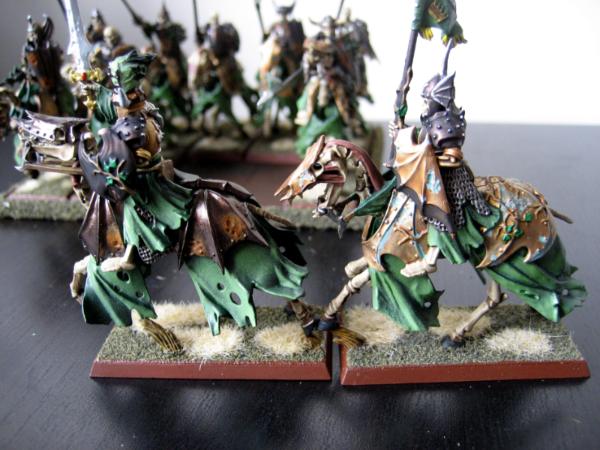 I'm using a Renegade Krome airbrush and Vallejo Model Air paints straight from the bottle (I don't thin them at all). I spray somewhere between 15 and 23 PSI, usually only going up to 23 when I'm basecoating or something (in which case, I don't care about the splatter). I have no idea what size nozzle I'm using - it came stock with the Krome. It's too big for real detail work, and I want to get a smaller nozzle, but I know nothing about nozzles or sizes or anything. I also don't really know what PSI I should be using, but I know that if I use too much higher of a PSI, I have to hold the brush much further back from the model, and the nozzle is so large that I basically can't do that unless I'm basecoating, because the area that I hit will be huge. Also, here's what's NOT happening: 1) You know when paint builds up on the tip of the needle, and then the very first time you depress the trigger, it splats that paint out, even if you aren't pulling back on the trigger to release paint from the cup? That's not what's causing this problem. 2) You know when paint builds up on the guards that extend out past the needle's tip, and blowing air through the brush will occasionally wick paint from that area and splatter it? That's not happening, either. So, I was hoping to get some help, both with the splatter effect and some info on needle/nozzle sizes.
|
|
This message was edited 2 times. Last update was at 2014/03/16 09:19:59
 1500 1500
 500 500
Vampire Counts 2400
 300 300
Circle Orboros 20 |
|
|
 |
|
2014/03/16 11:35:36
Subject: Airbrush Splatter Around the "Edges"
|
|

Grizzled Space Wolves Great Wolf
|
If you increase the pressure does the splatter go away? How about if you thin the paint out more?
Those are the 2 main causes of splatter next to something being wrong with the AB. Have you pulled the nozzle off and tried to clean it? Try and clean out the nozzle and also clean out the passage that the needle passes through.
If the pressure increase, thinning out the paint and a thorough clean doesn't fix it, could be a flaw in the needle.
Check this for some visual guidance on when paint is too thick, too thin, or pressure is too high/low.
http://homepage.eircom.net/~safc/airbrush1.htm
|
|
|
|
|
2014/03/16 11:55:28
Subject: Airbrush Splatter Around the "Edges"
|
|
Boosting Ultramarine Biker
|
I have this problem when there is a slight lump of paint that hasn't been thinned properly in the nozzle. But if your using vma and not thinning your paints can't think what it would be.
Are the nozzle where paint comes and and the air nozzle aligned properly?
|
|
|
|
|
2014/03/18 19:12:16
Subject: Re:Airbrush Splatter Around the "Edges"
|
|

Fresh-Faced New User
Belleville, IL
|
I have had this problem from time to time, and it can also be from paint accumulating in the little cap/ring on the front of the brush that protects the needle. Some of the brushes this can be removed, and they work fine with out it. I have also noticed that I get this splatter when first pressing down on the trigger on a dual action brush, so I try to get in the habit of not pointing the brush at the model when pushing the trigger for air. I think the the splatter in this case is from paint sitting on the needle.
I have a few of the cheap china/ebay airbrushes and they did this badly. Upon closer inspection I noticed that the nozzle tip with the needle removed was not proud of the nozzle cap/head. So paint was accumulating in the opening where the air should come out from the head. This typically caused slatting and or paint would simply stop being sprayed. Removing the nozzle cap/head and cleaning out the while that the nozzle shoots through would fix it for a while. For a permanent fix I sanded down the back side of the nozzle cap/head just enough so the nozzle tip stuck out just a bit. This solved the problem. One one of the brushes I sanded the back down too far, and had top make the hole a little bigger to allow air to flow out of the brush again. It did not seem to effect performance of the brush.
Dale
|
|
|
|
|
2014/03/18 19:41:07
Subject: Airbrush Splatter Around the "Edges"
|
|
Colonel
This Is Where the Fish Lives
|
 Tangent wrote: Tangent wrote:I'm using a Renegade Krome airbrush and Vallejo Model Air paints straight from the bottle (I don't thin them at all). I spray somewhere between 15 and 23 PSI, usually only going up to 23 when I'm basecoating or something (in which case, I don't care about the splatter).
That is most likely your problem. I know the VMA paints are advertised as "airbrush ready" but they still require thinning, especially at lower pressures. You will find that some colors are more problematic than others.
I have no idea what size nozzle I'm using - it came stock with the Krome. It's too big for real detail work, and I want to get a smaller nozzle, but I know nothing about nozzles or sizes or anything. I also don't really know what PSI I should be using, but I know that if I use too much higher of a PSI, I have to hold the brush much further back from the model, and the nozzle is so large that I basically can't do that unless I'm basecoating, because the area that I hit will be huge.
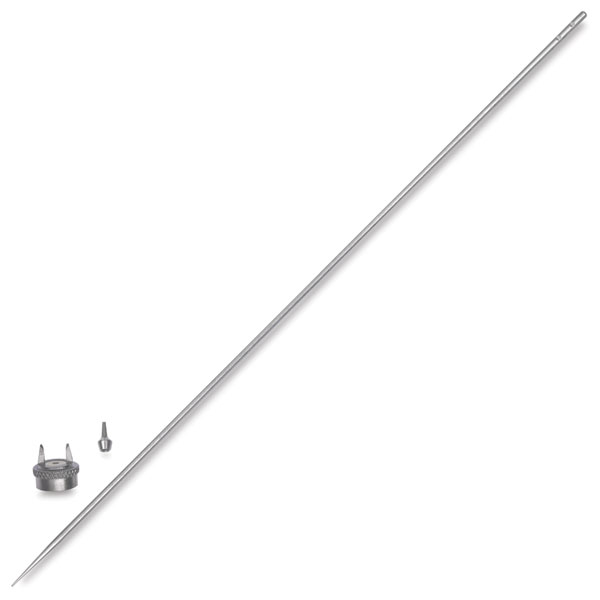
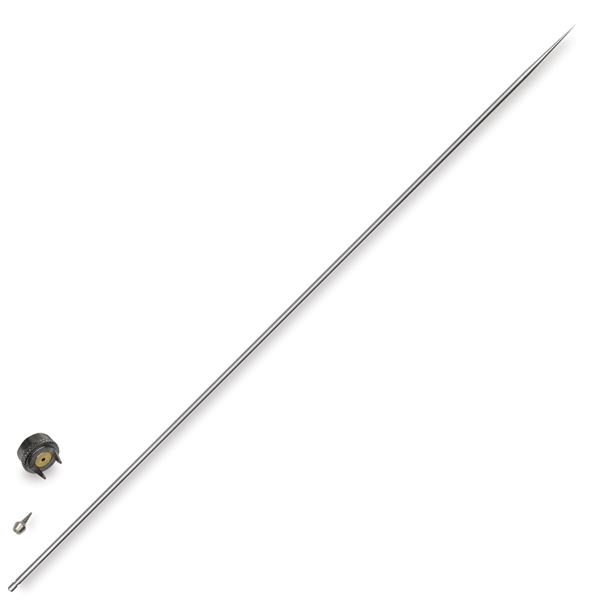
The Renegade series uses two needle sizes, .33mm and .21mm, that Badger labels "Fine" and "Ultra Fine," respectively. If you pull the needle out of the airbrush and look at the non-pointy end, there will markings; two notches for .33mm and one notch for .21mm.
Fine needle/nozzle9 (.33mm):
Ultra Fine needle/nozzle (.21mm):
Chances are you purchased the Krome as a "2-in-1" set, meaning it came with the needle/nozzles for both sizes. Mine came with the .21mm needle already in the airbrush. If yours came with no other needle/nozzles, just pull the needle out and look at the notches on the end like in the pictures I linked.
Also, here's what's NOT happening:
1) You know when paint builds up on the tip of the needle, and then the very first time you depress the trigger, it splats that paint out, even if you aren't pulling back on the trigger to release paint from the cup? That's not what's causing this problem.
Paint can also get stuck and dry inside the nozzle and it is very hard to remove if that happens. The best way to clean it is drop it in an ultrasonic cleaner with your cleaner of choice (Windex, Simple Green, airbrush cleaner, etc.) and let it run a couple of cycles.
2) You know when paint builds up on the guards that extend out past the needle's tip, and blowing air through the brush will occasionally wick paint from that area and splatter it? That's not happening, either.
If you have paint building up on the needle guard, there is a good chance that the tip of the needle is bent. That would also be what is causing the paint to splatter.
So, I was hoping to get some help, both with the splatter effect and some info on needle/nozzle sizes.
Hopefully you can get this issue cleared up and get back to painting problem free!
|
 d-usa wrote: d-usa wrote:"When the Internet sends its people, they're not sending their best. They're not sending you. They're not sending you. They're sending posters that have lots of problems, and they're bringing those problems with us. They're bringing strawmen. They're bringing spam. They're trolls. And some, I assume, are good people."
|
|
|
|
|
2014/03/19 10:13:31
Subject: Re:Airbrush Splatter Around the "Edges"
|
|
Ghastly Grave Guard
|
Thanks for all of the input, everyone. If you increase the pressure does the splatter go away? How about if you thin the paint out more?
Yeah, I think so, but it's hard to tell because the only thing I can do with higher pressure is basecoat and prime, and since I'm usually covering the entire model, the splatter is less noticeable. Are the nozzle where paint comes and and the air nozzle aligned properly?
I'm not really sure what you mean. Upon closer inspection I noticed that the nozzle tip with the needle removed was not proud of the nozzle cap/head. So paint was accumulating in the opening where the air should come out from the head.
So, you're saying that the tip of the nozzle should protrude out past the bottom of the guard? ...especially at lower pressures.
What is considered a "low" pressure? 20? 15? Lower? The Renegade series uses two needle sizes, .33mm and .21mm, that Badger labels "Fine" and "Ultra Fine," respectively. If you pull the needle out of the airbrush and look at the non-pointy end, there will markings; two notches for .33mm and one notch for .21mm.
Here is a shot of the two needles and nozzles that came with my Krome: 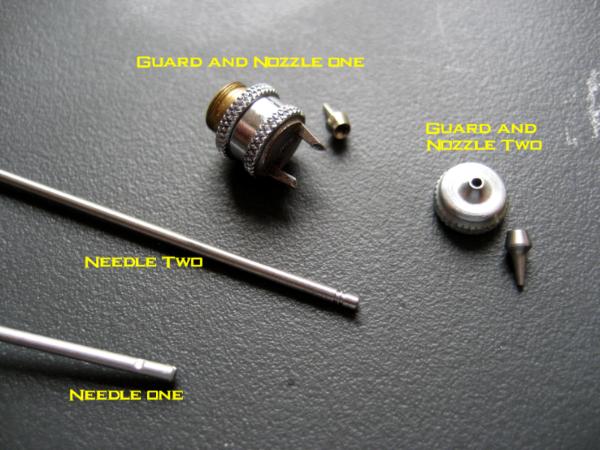 Needle One and Guard and Nozzle One have been inside the airbrush since the day that I bought it. I've never used the secondaries. As you can see, the markings on my needles are different than in the pictures you posted. And yes, in Needle Two, it has two small notches very close together. So, both the nozzle size AND the needle size will affect the size of the spray? If you have paint building up on the needle guard, there is a good chance that the tip of the needle is bent. That would also be what is causing the paint to splatter.
Well, it doesn't happen that much, or that fast. I usually have to be consistently airbrushing for about 15 or 20 minutes before it happens. Or, if I'm really blasting lots of paint all at once, it will happen faster. How can I tell if my needle is bent otherwise?
|
|
This message was edited 1 time. Last update was at 2014/03/19 10:14:53
1500
500
Vampire Counts 2400
300
Circle Orboros 20 |
|
|
|
|
|
|
|