Switch Theme:

Painting Technique Question.  [RSS] Share on facebook Share on Twitter Submit to Reddit
»
Author Message
Advert


Forum adverts like this one are shown to any user who is not logged in. Join us by filling out a tiny 3 field form and you will get your own, free, dakka user account which gives a good range of benefits to you:
  • No adverts like this in the forums anymore.
  • Times and dates in your local timezone.
  • Full tracking of what you have read so you can skip to your first unread post, easily see what has changed since you last logged in, and easily see what is new at a glance.
  • Email notifications for threads you want to watch closely.
  • Being a part of the oldest wargaming community on the net.
If you are already a member then feel free to login now.


Made in ca
Longtime Dakkanaut


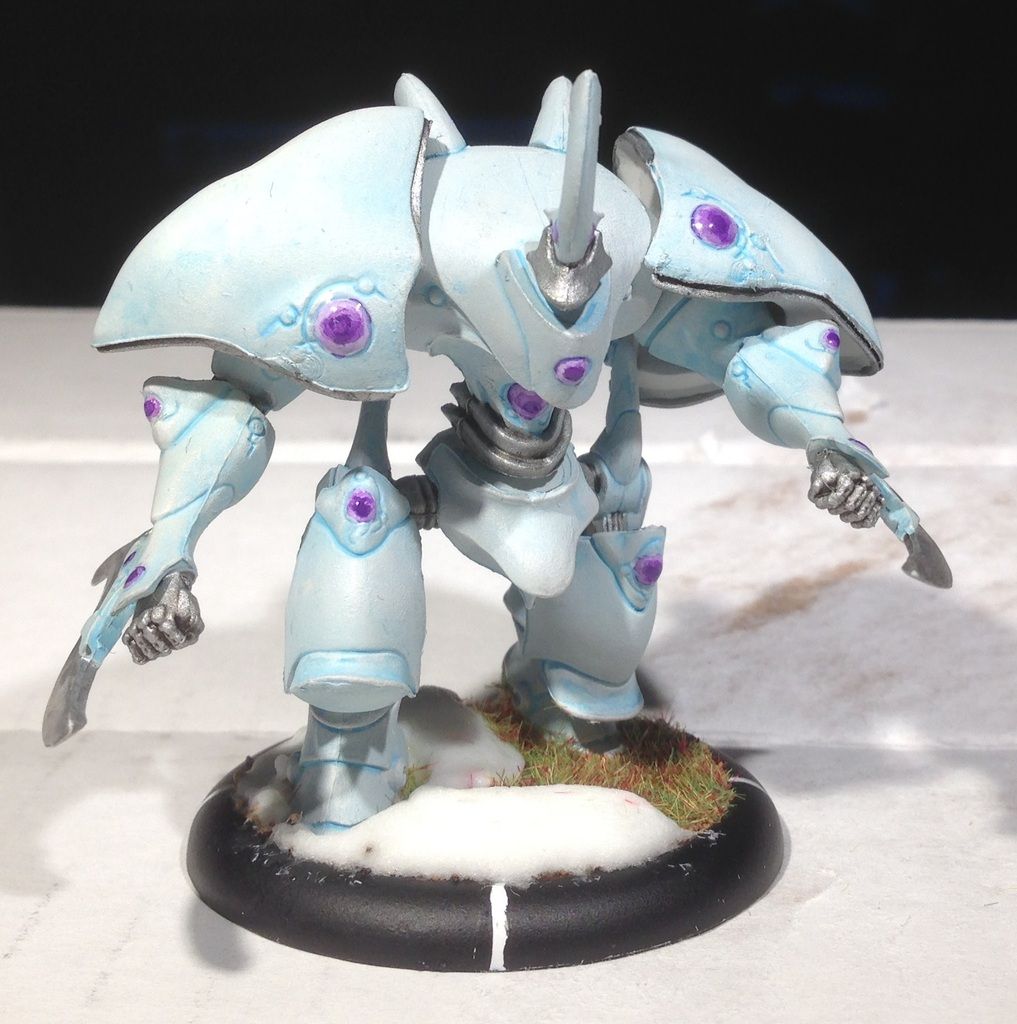
I'm painting my Ta'unar and I want to try something new. How do I go about adding fading and that wind blasted look I see on so many mini's. I know it's best to do it with an airbrush but that is simply out of the question for health concerns because of who I live with right now. SO I need to do it the old fashioned hard way. If you can link some good tutorials on how to do it and explain it that would also help. I think I found a video describing the technique, but it was of such low quality I can't say for sure. The way it was explained in the video is that the painter thinned down some shade paint of his choice. Then applies some to his brush. He dabs most of it off until only a small amount is on his brush making it just barely wet and wiht paint and then starts to paint the areas in question so that some of them look slightly darker than others.
Spoiler:


Also on a related note what is this painting technique called? If any. Thanks.
   
Made in ca
Junior Officer with Laspistol


London, Ontario

Sounds like "drybrushing". Typically, you'd use this technique in reverse, to brighten the edges of details with a lighter colour, but it could be used on "flat" surfaces to darken them, as well.

On this model, if you look under the model's left shoulder guard, you can see the blue wash that covered the entire model. I drybrushed the model up to white from that, which leaves some of the blue showing through. You could easily do that the other way around, and drybrush a lighter colour towards dark, leaving the light colour showing through. A "wash" would be ideal, as the pigment would be thinned, allowing more of the base colour to shine through.

More passes with the brush leaves more colour on the model.
This message was edited 1 time. Last update was at 2017/03/24 01:10:01


Made in ca
Longtime Dakkanaut


Great idea, unfortunately I already painted up the darker colour on my end. So it this is the way I wanted to go it's too late now. Thanks for the great idea though.
   
Made in ca
Junior Officer with Laspistol


London, Ontario

Well, if you've already got the dark, just do like I did and drybrush the light over top. Go "heavier" in the light areas, and go "lighter" on the darkened area. That should work. I thought you already had the lighter areas done, and wanted to darken them.
   
 
Forum Index » Painting & Modeling
Go to: