Switch Theme:

Flames & Lightsourcing experiment- getting the glow? (WM Thor Steinhammer)  [RSS] Share on facebook Share on Twitter Submit to Reddit
»
Author Message
Advert


Forum adverts like this one are shown to any user who is not logged in. Join us by filling out a tiny 3 field form and you will get your own, free, dakka user account which gives a good range of benefits to you:
  • No adverts like this in the forums anymore.
  • Times and dates in your local timezone.
  • Full tracking of what you have read so you can skip to your first unread post, easily see what has changed since you last logged in, and easily see what is new at a glance.
  • Email notifications for threads you want to watch closely.
  • Being a part of the oldest wargaming community on the net.
If you are already a member then feel free to login now.


Made in us
Privateer


The paint dungeon, Arizona

So, I got this awesome lil stumpy dude in a recent trade with radical_bob. Seeing the lil flamey bit I decided to try something different from what I would normally do. I did up a quickie 'blah' paint job with a few leathery colors and the metal bits- as this was mostly an experiment I didnt want to put alot of effort into the basic paint if I was just going to end up stripping it if I botched the flames & glow effects.
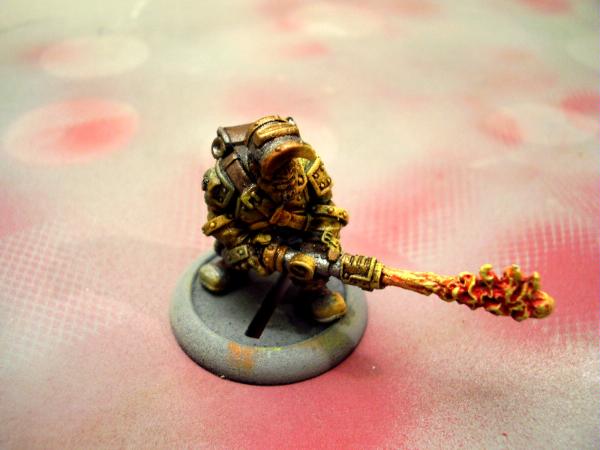
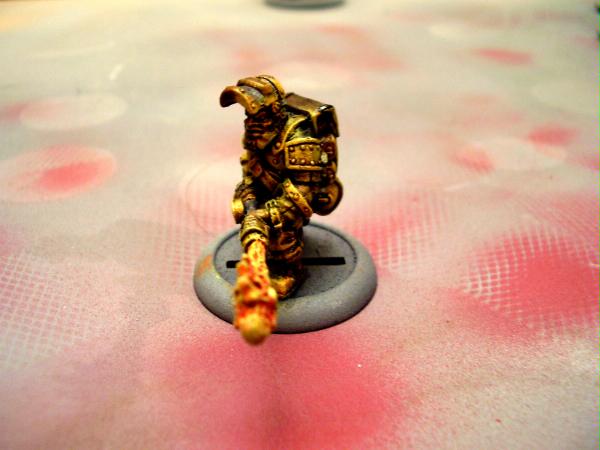


To line up where the light sourcing effects went, I just eye balled it and the raised areas that had actual line of sight to the flames got the highlighting treatment. I did him with a dirty/greasy look to start with, so theres alot of contrast between his dark dwarfy colors and the brighter flames.

I have some Vallejo flourescents coming from the Warstore, yellow & orange, which I want ot use to get one more layer of 'pop' with sime fine highlights- especially on the metallic bitz.

Aside from the obvious lack of basing- what do you guys think of the first attempt at this sort of effect?
   
Made in us
Tunneling Trygon


Picture is sorta crap, but from what I can see, it looks very effective.

You can sorta "double check" yourself by shining a little pen light from the source.

Another thing to try, which I've never gotten around to, would be to prime the guy black, then hit it with a single blast of white from the light source. This will give you a good idea where the light should hit, and you can then work forward from there. The different undercoat will give some lightening effect itself, and then having it there to stare at as you paint will remind you what you're dealing with.


=====Begin Dakka Geek Code=====
DA:70+S++G+++M+++B++I++Pw40k00#+D++A++++/wWD250T(T)DM++
======End Dakka Geek Code======

http://jackhammer40k.blogspot.com/ 
   
Made in gb
Preacher of the Emperor


Manchester, UK

Pretty good for a first try!

I would probably go back and put some orange into the brightest areas though. Yellow reflections are fine for a candle, but to give that impression of heat as well; some orange lowlights would really make it pop

1500pts

Gwar! wrote:Debate it all you want, I just report what the rules actually say. It's up to others to tie their panties in a Knot. I stopped caring long ago.


Made in us
Privateer


The paint dungeon, Arizona

With the cam I have- the pics are rather good lol. I knew when taking the pics it wasnt going to be easy to get things just right. Even with adjusting the pic settings, I cant quite get it to match up with the actual fig.

@phryxis, the scale involved makes getting an eyeball veiw with a penlight kinda tedious- since its just an inch or so eye balling it is just as effective. I was thinking about using my airbrush for it- but my air tank was empty and it was 113 outside. So I didnt want to face the oven to fire up my compressor to refill it lol

@ J Black, I tried more orange at first, but I guess my orange Im using currently isnt storng enough as it was far too muted/subtle. Im hoping that the flourescents I have coming will get that extra luminous effect and I can fine tune that with red/orange/yellow washes on the high lights to get it just right.
   
 
Forum Index » Painting & Modeling
Go to: