| Author |
Message |
 |
|
|
|
|
Advert
|
Forum adverts like this one are shown to any user who is not logged in. Join us by filling out a tiny 3 field form and you will get your own, free, dakka user account which gives a good range of benefits to you:
- No adverts like this in the forums anymore.
- Times and dates in your local timezone.
- Full tracking of what you have read so you can skip to your first unread post, easily see what has changed since you last logged in, and easily see what is new at a glance.
- Email notifications for threads you want to watch closely.
- Being a part of the oldest wargaming community on the net.
If you are already a member then feel free to login now. |
|
 |
2009/04/17 14:51:04
Subject: Recommendations for digital cameras?
|
|

Dakka Veteran
|
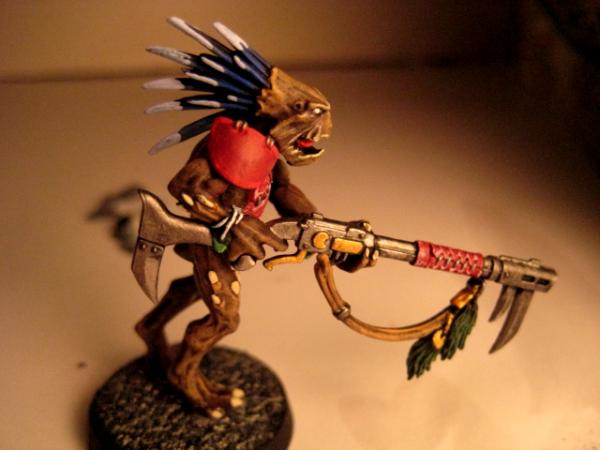
So I'm looking to buy a better camera for miniature photography. I've got an HP Photosmart E317 right now and it's absolutely horrible at everything. I know how to work the settings. I have a light box. I have a tripod. I can't get it to take a decent pic....especially of miniatures. Here are some of the better pics that I've taken with it. I've worked with them all in Gimp, too.


So what do you guys recommend? I've been doing a lot of research and it seems like the Canon A590 SI is a pretty good camera at around $125. The Nikon Coolpix gets good reviews for around $100, too. I don't want to spend a lot and the only really high quality pics that I'm concerned about are closeups of my miniatures. Any camera will do a fair job when I'm just pointing and shooting on vacation or whatever. I just want something that's cheap and will take good closeups of models.
|
|
|
|
 |
|
2009/04/17 17:31:09
Subject: Re:Recommendations for digital cameras?
|
|
Fresh-Faced New User
|
I use the Canon SD770 IS Elph
It has a pretty decent macro and it takes great point and shoot pics too.
|
|
|
|
|
2009/04/17 17:36:55
Subject: Re:Recommendations for digital cameras?
|
|
Grey Knight Psionic Stormraven Pilot
|
I use a Canon PowerShot SD800 IS. I love it. Just make sure that whatever camera you get has the ability to take "macro" pics. That allows you to have a focal length of a couple inches and still get excellent detail. You can save a couple of bucks and get a 8 megapixel. 10 is great, but can be a bit pricey. Here is an example of the quality of mine.
http://www.dakkadakka.com/gallery/10667-Front.html?m=2
EDIT: Artyboy, your Avatar looks fantastic. I sure hope you can resolve your photo issue. Would love to see a clean pic.
|
|
This message was edited 1 time. Last update was at 2009/04/17 17:38:39
 
  REPENT! For tomorrow you die! REPENT! For tomorrow you die!
"I may not have gone where I intended to go, but I think I have ended up where I needed to be." - Douglas Adams |
|
|
|
|
2009/04/17 18:59:52
Subject: Recommendations for digital cameras?
|
|
Dakka Veteran
|
I'm not too concerned with the megapixel count. By the time the pic is ready to start showing off it's so small that more megapixels don't make a difference. I'm more concerned with picture quality and level of detail. The camera that I use now does have a macro function. It's just worthless  .
|
|
|
|
|
|
2009/04/17 19:12:24
Subject: Re:Recommendations for digital cameras?
|
|
Shrieking Traitor Sentinel Pilot
|
Camera Musts:
Must have Macro - easy
Must have 3 to4 MP ( you don't need a lot of MP since you are taking macro photos)
Must have W/B - White balance. Hopefully one you can manually set. Some come with different settings - daylight, flourescent, and incandescent. If you see really yellow or blue photos...this is bad white balance.
Must have: Tripod. Can't take long shutter pics without it.
Must have: Matched bulbs for shooting. Nothing will confuse your camera's intelligence more then trying to read lighting from several sources. It will try an compensate for the different wavelengths it registers. Often with disatrous results.
Nice to have:
Shutter control - S
Aperture control - F stop - A Generally higher the better.
Photo tent.
If don't have a choice sometimes you can get a camera that lets you set one or the other. Longer shutter times allow more detail to be picked up in the photo. Aperture allow you to get the proper depth of field.
If you see figs with an arm in front blurry but a clear face this is a focal length issue. Macro alone won't take care of it.
Now before you throw that camera away I got done reviewing your manual.
http://h10032.www1.hp.com/ctg/Manual/c00492399.pdf
1) Set to low ISO... 100. (decreases shutter speed)
2) Set to Macro - your macro is looking for an object between 60 cm and 1m
3) use the zoom to go in close or crop in a photo edit program
4) Set WB to your lighting type. Use the same light in all lamps around figure. By same light I mean the same GE 100 watt bulb from the same package in all 3 of your lamps. Don't use a 60, 75 and 100 watt bulb they may emit at different spectrums. If you still get a yellow (or blue) pic after standardizing your lighting then try another WB setting without changing other settings.
5) Once you get the color right try a range of EV settings. If you are taking the picture in front of a light background EV in the negatives will be better.
6) shoot on landscape mode. This gives a broader depth of field should eliminate any bluryness.
7) turn off your flash. Lighting should only be from bulbs. The lamp doesn't matter just the bulb.
|
|
This message was edited 2 times. Last update was at 2009/04/17 19:21:46
|
|
|
|
|
2009/04/17 19:39:01
Subject: Re:Recommendations for digital cameras?
|
|
Dakka Veteran
|
jgemrich wrote:Now before you throw that camera away I got done reviewing your manual.
http://h10032.www1.hp.com/ctg/Manual/c00492399.pdf
1) Set to low ISO... 100. (decreases shutter speed)
2) Set to Macro - your macro is looking for an object between 60 cm and 1m
3) use the zoom to go in close or crop in a photo edit program
4) Set WB to your lighting type. Use the same light in all lamps around figure. By same light I mean the same GE 100 watt bulb from the same package in all 3 of your lamps. Don't use a 60, 75 and 100 watt bulb they may emit at different spectrums. If you still get a yellow (or blue) pic after standardizing your lighting then try another WB setting without changing other settings.
5) Once you get the color right try a range of EV settings. If you are taking the picture in front of a light background EV in the negatives will be better.
6) shoot on landscape mode. This gives a broader depth of field should eliminate any bluryness.
7) turn off your flash. Lighting should only be from bulbs. The lamp doesn't matter just the bulb.
The above photos were taken with the following setup:
1) ISO 100
2) Macro set
3) Zoomed in with the camera about a foot away from the model. I also tried some pics with more zoom from farther back and they turned out about the same.
4) WB set to flourescent setting with 3 of those flourescent light bulbs that are supposed to be the equivalent of 75W incandecents
5) I've played with the EV settings
6)I'll give landscape mode a try
7) Flash is off.
I've been using one of those cheesy little mini tripods. It holds the camera steady but it's kinda hard to get it to stay where you want it to when you lock it down. I ordered a bigger tripod just today. My lighting setup isn't ideal. I just use desk lamps. Maybe I'll pick up some better lamps. The macro focus range is just too far away to be very useful. At 3 feet you have to zoom in almost all the way. Since it's a crappy camera, anyway, it doesn't make for very quality pics.
|
|
|
|
|
|
2009/04/17 19:51:32
Subject: Re:Recommendations for digital cameras?
|
|

Fixture of Dakka
|
What's your budget?
|
 Do you play 30k? It'd be a lot cooler if you did. Do you play 30k? It'd be a lot cooler if you did. |
|
|
|
|
2009/04/17 20:06:39
Subject: Recommendations for digital cameras?
|
|
[ARTICLE MOD]
Huge Hierodule
|
I use a mini tripod for my Nikon Coolpix and it's worked out quite well for me. It's the kind with bendable legs, much like this one:
http://www.bkaphoto.com/detail.asp?section=Tripods&cat=Mini-Tripods&product=NP714
|
|
|
|
|
|
2009/04/17 20:14:32
Subject: Re:Recommendations for digital cameras?
|
|
Regular Dakkanaut
Cincy, OH
|
Nikon D40X or D60.
Love mine!
|
burp. |
|
|
|
|
2009/04/17 20:19:36
Subject: Recommendations for digital cameras?
|
|
Dakka Veteran
|
~$100. I could go higher if the more expensive camera has a lot more features that really make the extra money spent worthwhile. I really don't want to go any higher than $200.
The A590 IS looks like a lot of bang for the buck. For $110 shipped it seems like a steal.
8 megapixel
4x zoom
ISO Sensitivity - Auto, High ISO Auto, ISO 80/100/200/400/800/1600 equivalent (Standard output sensitivity. Recommended exposure index)
White Balance Control - Auto, Preset (Daylight, Cloudy, Tungsten, Fluorescent, Fluorescent H), Custom
Shooting Modes - Auto, Easy, P, Av, Tv, M, Portrait, Landscape, Special Scene (Foliage, Snow, Beach, Sunset, Fireworks, Night Scene, Aquarium), Indoor, Kids & Pets, Night Snapshot, Movie
It's got a viewfinder which is nice
|
|
|
|
|
|
2009/04/17 20:25:34
Subject: Re:Recommendations for digital cameras?
|
|
Shrieking Traitor Sentinel Pilot
|
artyboy wrote:jgemrich wrote:Now before you throw that camera away I got done reviewing your manual.
http://h10032.www1.hp.com/ctg/Manual/c00492399.pdf
1) Set to low ISO... 100. (decreases shutter speed)
2) Set to Macro - your macro is looking for an object between 60 cm and 1m
3) use the zoom to go in close or crop in a photo edit program
4) Set WB to your lighting type. Use the same light in all lamps around figure. By same light I mean the same GE 100 watt bulb from the same package in all 3 of your lamps. Don't use a 60, 75 and 100 watt bulb they may emit at different spectrums. If you still get a yellow (or blue) pic after standardizing your lighting then try another WB setting without changing other settings.
5) Once you get the color right try a range of EV settings. If you are taking the picture in front of a light background EV in the negatives will be better.
6) shoot on landscape mode. This gives a broader depth of field should eliminate any bluryness.
7) turn off your flash. Lighting should only be from bulbs. The lamp doesn't matter just the bulb.
The above photos were taken with the following setup:
1) ISO 100
2) Macro set
3) Zoomed in with the camera about a foot away from the model. I also tried some pics with more zoom from farther back and they turned out about the same.
4) WB set to flourescent setting with 3 of those flourescent light bulbs that are supposed to be the equivalent of 75W incandecents
5) I've played with the EV settings
6)I'll give landscape mode a try
7) Flash is off.
I've been using one of those cheesy little mini tripods. It holds the camera steady but it's kinda hard to get it to stay where you want it to when you lock it down. I ordered a bigger tripod just today. My lighting setup isn't ideal. I just use desk lamps. Maybe I'll pick up some better lamps. The macro focus range is just too far away to be very useful. At 3 feet you have to zoom in almost all the way. Since it's a crappy camera, anyway, it doesn't make for very quality pics.
Sounds like you've made a good attempt at it.
My first thought when I saw 2ft to 3ft for your recommended macro range (60cm+) was to be a little surprised. My camera is 10cm for Macro and 1 cm for super macro.
Your pics are blue so unless you are changing this color profile in GIMP it tells me the camera really doesn't have a good WB sensor.
Good luck in your search.
|
|
|
|
|
2009/04/18 01:28:20
Subject: Re:Recommendations for digital cameras?
|
|
Dakka Veteran
|
Taking pics from the recommended macro distance helped a lot. I also did some tweaking with gimp to get the colors right. I think that this is about as detailed and close up as I'm going to be able to get, though. I still think I want to upgrade to something that can perform better.

|
|
This message was edited 1 time. Last update was at 2009/04/18 01:53:55
|
|
|
|
|
2009/04/21 18:57:03
Subject: Re:Recommendations for digital cameras?
|
|
Fixture of Dakka
|
Go with the a590, very good value for the money, takes really nice macros.
|
Do you play 30k? It'd be a lot cooler if you did. |
|
|
|
|
2009/04/21 23:35:46
Subject: Recommendations for digital cameras?
|
|
Servoarm Flailing Magos
|
Polaroid - i1035
cost: 95 bucks at target (USD)
Features:
Macro, Flash, Tripod availability, SD card memory, large screen (3 inches), Adjustable shutter speed, adjustable exposure, adjustable resolution (up to 10 Mega Pixel), white balance adjustment settings, able to take video, 3x optical zoom, and so on.
My take:
Hey, it was less than 100 bucks, leaving me with money left over to buy the tripod and SD card. it only has 16 MB of memory on the camera, so buying a SD card is pretty much mandatory, but a sd card is cheap (7 bucks for a 1 GB). I take ok pictures with it. The only problem I had at first was battery consumption. It chewed through my batteries like mad until I bought some high performance rechargables, which greatly helped my pocket book in the long run. Good camera for under 100 bucks.
|
http://www.teun135miniaturewargaming.blogspot.com/ https://www.instagram.com/teun135/
Foxphoenix135: Successful Trades: 21
With: romulus571, hisdudeness, Old Man Ultramarine, JHall, carldooley, Kav122, chriachris, gmpoto, Jhall, Nurglitch, steamdragon, DispatchDave, Gavin Thorne, Shenra, RustyKnight, rodt777, DeathReaper, LittleCizur, fett14622, syypher, Maxstreel |
|
|
|
|
2009/04/22 00:52:37
Subject: Recommendations for digital cameras?
|
|

Anti-Armour Swiss Guard
|
I use a pentax istDL DSLR.
6mp with a 2gb memory card, shooting on RAW.
Huuuge file sizes, but allows me to tweak the images without altering the data (jpegs lose data every time you save/resave.).
But, as a DSLR, it allows me to use ALL of my optics from my film pentax (including the macro and tele gear), in addition to the macro program settings (which just take care of shutter speed and aperture).
Your budget may not extend to a DSLR, though. Mine did, but I won't use a compact camera at all (don't like them).
|
I'm OVER 50 (and so far over everyone's BS, too).
Old enough to know better, young enough to not give a ****.
That is not dead which can eternal lie ...
... and yet, with strange aeons, even death may die.
|
|
|
|
|
2009/04/22 01:17:23
Subject: Recommendations for digital cameras?
|
|
Dakka Veteran
|
I replaced the 60w bulbs for a couple of 26w florescent bulbs and it made a pretty big difference. You can actually see some detail and some of my mistakes.

|
|
|
|
|
|
2009/04/22 04:49:17
Subject: Recommendations for digital cameras?
|
|
Homicidal Veteran Blood Angel Assault Marine
|
I don't mean to hijack this thread, but I have a relevent question:
What type of lighting are you guys using when you take your pics? I'm in the process of contructing a lightbox, but I haven't really figured out the best bulbs/fixtures to light the box with.
I'm shooting with a Nikon D50 and should have a dedicated Macro lens in the near future but until then I'm limited to the kit lens or nifty fifty. I get on fine with them for now, but need to fix my lighting situation in order to produce more proper images of my models either way 
|
|
|
|
|
2009/04/22 08:37:03
Subject: Recommendations for digital cameras?
|
|
Pyromaniac Hellhound Pilot
|
I personally recommend one without a lens that moves in and out. These have a tendency to break, and it sucks when they do. I like Pentax myself.
|
It's better to simply be an idiot, as no one can call you on it here. -H.B.M.C.
Cap'n Gordino's instant grammar guide:
"This is TOO expensive." "I'm going TO the store, TO get some stuff."
"That is THEIR stuff." "THEY'RE crappy converters."
"I put it over THERE." "I'll go to the store THEN."
"He knows better THAN that." "This is NEW." "Most players KNEW that." |
|
|
|
|
2009/04/22 14:17:11
Subject: Recommendations for digital cameras?
|
|
Dakka Veteran
|
Here's my setup. It's just a box from a logitech keyboard and some clip on desk lamps with 26w florescent bulbs.

|
|
This message was edited 2 times. Last update was at 2009/04/22 14:19:13
|
|
|
|
|
2009/04/22 14:20:06
Subject: Recommendations for digital cameras?
|
|
Avatar of the Bloody-Handed God
|
Try compact florescent, they seem to have a warm glow rather then the bluish cold tint.
|
Paused
◙▬▬▬▬▬▬▬▬▬▬▬▬▬
◂◂ ► ▐ ▌ ◼ ▸▸
ʳʷ ᵖˡᵃʸ ᵖᵃᵘˢᵉ ˢᵗᵒᵖ ᶠᶠ |
|
|
|
|
|
|


