After a request from Swordwind on my P&M blog on how I painted my red eldar gems on my titan I thought it would be apt to add a tutorial and give a bit back to dakka after all the great help ive had from you all

So here goes, the step by step instructions are followed by pictures comparing each stage, these will be reorganised once the pics are available in my gallery as ive only just uploaded them, but hopefully somebody can find it useful

1- Paint the gem chaos black, making sure you get a nice even smooth coat of paint
2- take some red gore, thin it down about 4-1 (4 parts paint, 1 water), carefully paint this all over the gem, roughly leaving the a top quarter of your choice unpainted, however paint a very thin line next to the gems border all around the gem so its a bit like a red circle. While the paints still wet and you find the transition from black to red is too harsh, very gently use your finger to alomost *smudge* the paint off of the model (i know this isnt a masterclass
lol) then with a clean & slightly damp (not wet, wash the brush then just tap it on some tissue) brush the surrounding red back towards the black spot.
3. take some blood red and thin it roughly 4-1, now paint an 'arc' of blood red surrounding the black spot, leaving a the red gore all around it. useing the same *smudgeing* technique if needed
4- take a mix of blood red & blazing orange 1-1 then thin to 4-1 and repeat the process, covering a smaller area
5- take blazing orange, thin 4-1 and repeat the process with an even smaller area
6- take skull white and carefully paint either a dot on small gems or a very fine line on large gems along the top edge of the black spot, this gives the impression of light reflecting off of the gem.
7- take some 'Ard coat and do 3-4 coats, leaving at least 10 minutes between coats to make sure it doesnt "texture" the previous coat with the bristles
Dan
Automatically Appended Next Post:
And heres what it looks like when put into practice on a model
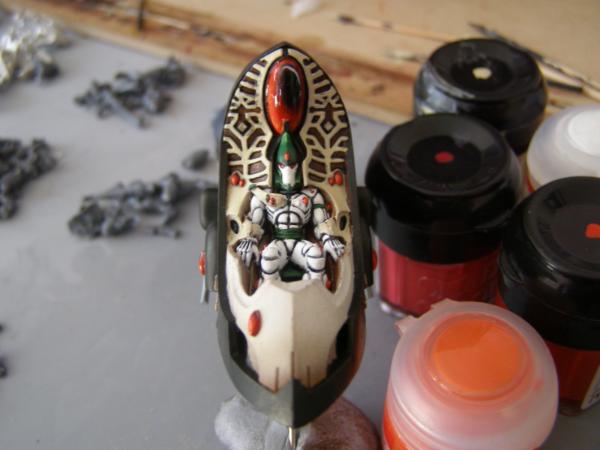


 1500 pts


 Thanks a lot mate. Those pics will seriously help me with my Biel-Tan force.
