Switch Theme:

Using washes in an airbrush  [RSS] Share on facebook Share on Twitter Submit to Reddit
»
Author Message
Advert


Forum adverts like this one are shown to any user who is not logged in. Join us by filling out a tiny 3 field form and you will get your own, free, dakka user account which gives a good range of benefits to you:
  • No adverts like this in the forums anymore.
  • Times and dates in your local timezone.
  • Full tracking of what you have read so you can skip to your first unread post, easily see what has changed since you last logged in, and easily see what is new at a glance.
  • Email notifications for threads you want to watch closely.
  • Being a part of the oldest wargaming community on the net.
If you are already a member then feel free to login now.


Made in us
Stealthy Warhound Titan Princeps


yep. works fine. basically acts as a filter layer.
Made in us
Stealthy Warhound Titan Princeps


a filter layer is a coat of paint that only very subtly change its appearance. A black filter would tint the entire model slightly darker... I use green paint filters to slightly alter the tone of my models after basecoating / initial highlights.
Made in us
Stealthy Warhound Titan Princeps


well, I've never tried to apply a filter with a brush, because I would think that a few brush strokes in it would kinda ruin the effect... the idea is to get a uniform change in color over the entire model.

As to how subtle the change can be... here's the only example I have a picture of... using a filter of VMC Transparent Green and VGC Thinner Medium (1-3 ratio)

Before :
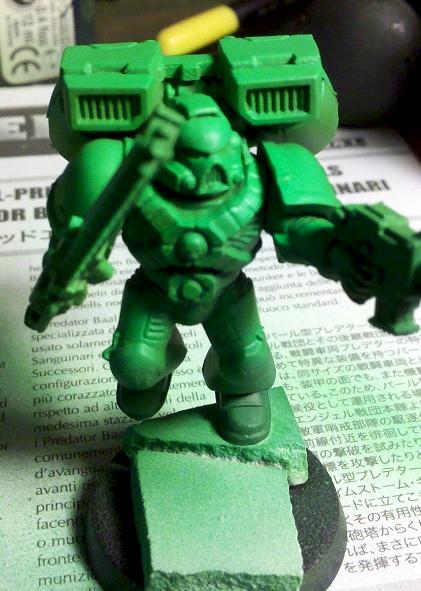

After:
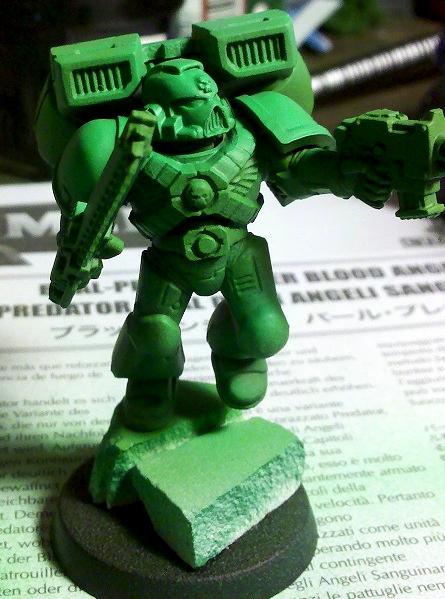

I've also used GW Badab Black straight up, if a model turns out a bit to "bright green", and I want to tone the whole thing down a shade or two. A very light coat is all it takes, but its a pretty subtle effect. I don't have any before and after pictures of using it though.
 
Forum Index » Painting & Modeling
Go to: