Switch Theme:

Help me paint this waveserpent  [RSS] Share on facebook Share on Twitter Submit to Reddit
»
Author Message
Advert


Forum adverts like this one are shown to any user who is not logged in. Join us by filling out a tiny 3 field form and you will get your own, free, dakka user account which gives a good range of benefits to you:
  • No adverts like this in the forums anymore.
  • Times and dates in your local timezone.
  • Full tracking of what you have read so you can skip to your first unread post, easily see what has changed since you last logged in, and easily see what is new at a glance.
  • Email notifications for threads you want to watch closely.
  • Being a part of the oldest wargaming community on the net.
If you are already a member then feel free to login now.


Made in gb
Painting Within the Lines


Poole Dorset UK

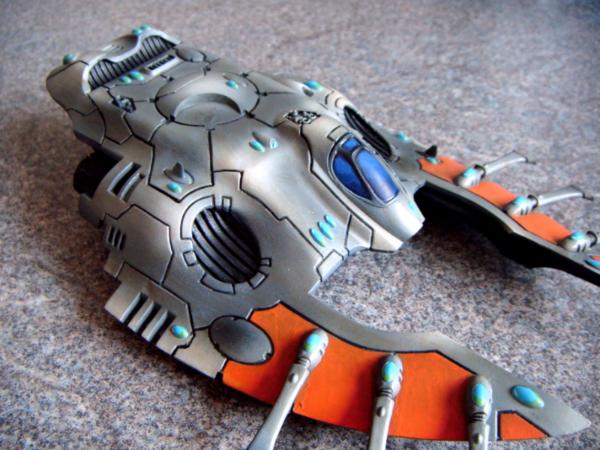
Please can I get some advice on how to paint this?

I basecoated black, worked my way up through dark grey, medium grey, light grey and white. Then I gave it a sepia wash.
After that I painted the orange, gems and window and added black to the recessed lines.

It's a bit dull though and I don't like the gems, I used a green and yellow for the refraction but it doesn't look good.

Some thoughts would be appreciated. I was tempted by leaving the side panels grey and painting flames going up the hull, but I'm still getting used to having an airbrush so thought KISS.

FOW: Soviet - Tankovy
Infinity: Aleph


Made in gb
1st Lieutenant


how about geometric orange lines with colour contrast from orange to yellow/red?

My FOW Blog
http://breakthroughassault.blogspot.co.uk/

My Eldar project log (26/7/13)
http://www.warseer.com/forums/showthread.php?p=5518969#post5518969

Exiles forum
http://exilesbbleague.phpbb4ever.com/index.php 
   
Made in gb
Painting Within the Lines


Poole Dorset UK

In an Ulthwe type stylee?

How about edge highlighting?

FOW: Soviet - Tankovy
Infinity: Aleph


Made in us
Regular Dakkanaut


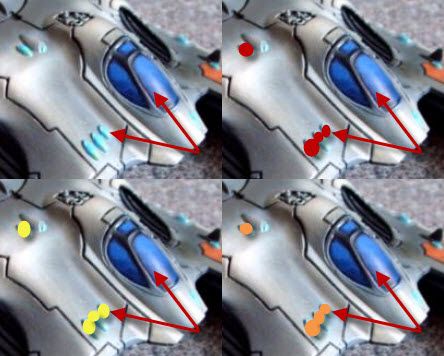
Part of the problem I think you are having is that you have conflicting colors between your canopy and your gems.

Because both are accent point on the model you need them to be opposing colors... like
blue - orange
yellow - purple
red - green
to name a few.

Now moving to the Primes in either direction is fine, but try not to get so close in color on the color wheel.


This will make things pop a bit more and less muted.
   
Made in gb
Painting Within the Lines


Poole Dorset UK

Good explanation, thanks SaganGree.

I think I'd quite like to do the jewels a darker blue, maybe do the canopy green?

What are your thoughts on the main body grey highlighting?

FOW: Soviet - Tankovy
Infinity: Aleph


Made in us
Regular Dakkanaut


Keep it the way it is... Edge highlighting is ok on sharp corners (IMO) but with the flowing lines of Eldar vehicles you loose a lot of the effect of the air brush.

I would however put another coat on the orange to clean up some of the brush lines.

A technique that I use with Red is to mix Red with Grey. This doesn't change the color much and gives you a LOT more pigment to spread and cleans up the transparency. Orange might take a lighter grey but its something I would play with for a solid color.
   
Made in gb
Painting Within the Lines


Poole Dorset UK

Interesting, thanks for the thoughts buddy.

Good luck with your footdar

FOW: Soviet - Tankovy
Infinity: Aleph


Forum Index » Painting & Modeling
Go to: