| Author |
Message |
 |
|
|
|
|
Advert
|
Forum adverts like this one are shown to any user who is not logged in. Join us by filling out a tiny 3 field form and you will get your own, free, dakka user account which gives a good range of benefits to you:
- No adverts like this in the forums anymore.
- Times and dates in your local timezone.
- Full tracking of what you have read so you can skip to your first unread post, easily see what has changed since you last logged in, and easily see what is new at a glance.
- Email notifications for threads you want to watch closely.
- Being a part of the oldest wargaming community on the net.
If you are already a member then feel free to login now. |
|
 |
2012/10/15 18:18:38
Subject: Some Grey Hunters and a Call for Advice on Photo Taking
|
|

Speedy Swiftclaw Biker
|
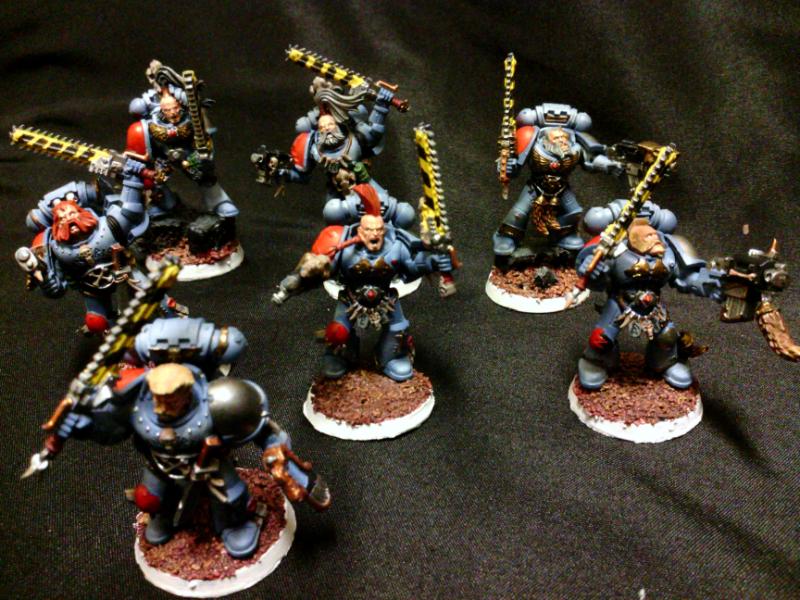
Here are some grey Hunters that I did and I wanted to test out different ways to take photos. I think I'm getting close to having something that works. If you have any suggestions please let me know as I seem to be getting frustrated that the details I've worked on are barely showing up (especially whites, I blend three different whites and they come out as solid bone  ). I have a few different images of this group in my gallery if you want to look and compare.
|
|
|
|
 |
|
2012/10/16 08:02:11
Subject: Some Grey Hunters and a Call for Advice on Photo Taking
|
|

Guard Heavy Weapon Crewman
|
Using a single colour as a background is a good choice, though I'd suggest something a little lighter; a very light grey might be a good choice here.
Second, it looks to me like you're only using a single light source, and it's high above the miniatures and not a diffused one. Try positioning two or more lamps at the table level facing the miniatures, one above them and use a piece of thin paper in front of the lamps to soften up the light.
|
Text goes here. |
|
|
|
|
2012/10/16 09:20:47
Subject: Some Grey Hunters and a Call for Advice on Photo Taking
|
|

Lady of the Lake
|
You also need the background to be smooth as the wrinkles in that probably aren't helping.
|
|
|
|
|
|
2012/10/16 09:42:14
Subject: Some Grey Hunters and a Call for Advice on Photo Taking
|
|
Anti-Armour Swiss Guard
|
Macro mode also limits the depth-of-field (what's in focus) and with some cameras, it's limited to a couple of cm at that distance.
A green (mid-dark) background would help those greys/reds pop as would a mid-dark blue.
|
I'm OVER 50 (and so far over everyone's BS, too).
Old enough to know better, young enough to not give a ****.
That is not dead which can eternal lie ...
... and yet, with strange aeons, even death may die.
|
|
|
|
|
2012/10/16 10:44:38
Subject: Re:Some Grey Hunters and a Call for Advice on Photo Taking
|
|
Decrepit Dakkanaut
|
I can confirm the "bleaching" of your colors is your light.You either need to make a pretty decent light box, or go outside and get some natural sunlight. I prefer the sun, because it is just great, and lately Ive found that a grey colored backdrop works best for me. I set minis on the concrete step in my backyard and it just seems to work, colors pop out from everywhere.Huge improvement over the last set of pics you put out though. See, youre on the right path already 
|
|
|
|
|
2012/10/16 10:53:37
Subject: Some Grey Hunters and a Call for Advice on Photo Taking
|
|

Stormin' Stompa
|
-Sunlight is best. Pictures taken on an overcast day is usually pretty good.
-Focus depth is enhanced by taking the picture from a greater distance and then cropping and zooming on the finished picture.
-A white background (or better yet a neutral grey) helps the camera "sort out" the white balance (represents the actual colour more accurately).
-Pictures taken with a phone-camera or a cheap point-n-shoot will never be as good as those taken with a "proper" camera, no matter how many mega-pixels they have.
-Proper treatment post-shooting greatly enhances pictures. I recommend Adobe Lightroom and Adobe Photoshop in combination. Tutorials are a-dime-a-dozen on Youtube and the programs can be gotten.....Let's say...really cheap. 
|
-------------------------------------------------------
"He died because he had no honor. He had no honor and the Emperor was watching."
 18.000 18.000  3.500 3.500  8.200 8.200  3.300 3.300  2.400 2.400  3.100 3.100  5.500 5.500  2.500 2.500  3.200 3.200  3.000 3.000
|
|
|
|
|
2012/10/16 14:04:07
Subject: Some Grey Hunters and a Call for Advice on Photo Taking
|
|
Speedy Swiftclaw Biker
|
You all have been very helpful. I'm looking forward to being able to crank out well taken photos.
|
|
|
|
|
|
|
|


