Switch Theme:

Laser printer decals  [RSS] Share on facebook Share on Twitter Submit to Reddit
»
Author Message
Advert


Forum adverts like this one are shown to any user who is not logged in. Join us by filling out a tiny 3 field form and you will get your own, free, dakka user account which gives a good range of benefits to you:
  • No adverts like this in the forums anymore.
  • Times and dates in your local timezone.
  • Full tracking of what you have read so you can skip to your first unread post, easily see what has changed since you last logged in, and easily see what is new at a glance.
  • Email notifications for threads you want to watch closely.
  • Being a part of the oldest wargaming community on the net.
If you are already a member then feel free to login now.


Made in au
Fresh-Faced New User


Hi All,

I'm mostly (read as almost exclusively) into historicals, but have known about DakkaDakka for years.

I'm currently working on a Sengoku period Japanese army and want to do a really top notch job on the Sashimonos (http://en.wikipedia.org/wiki/Sashimono), which gives me the choice of doing really basic hand painted mons (http://en.wikipedia.org/wiki/Mon_%28emblem%29), and since my preferred Daimyo is Oda Nobunaga that's not really practical or go to decals. I've therefore decided to go with decals (or transfers - whatever term rings your bell) and would like to pick the brains of the forum for any hints etc.

I know the basics.

Print only on the appropriate paper (laser for laser, inkjet for inkjet)
Print only on white paper if appropriate.
Print only on clear paper if appropriate.
Seal inkjet paper before you get it wet.

Stuff like that, but what I'm after is the hidden nasties.

What I've done is made a sheet of Mons with various coloured mons on various coloured backgrounds. I'm planning on printing that out on white decal paper. The idea being that if I use the correct colours for the background that match the paints which I will be using (which I have) then I can more easily blend the transfer background colour onto the sashimono.

So, have at it. Let me know your pearls of wisdom .

Thanks.

This message was edited 1 time. Last update was at 2014/02/24 22:04:36


Made in au
Fresh-Faced New User


Actually, I just realised I've really put this in the wrong forum site. I'm not giving a tutorial, I'm asking for one... so if a moderator or similar could more this to a more appropriate forum I'd appreciate it.
   
Made in gb
Longtime Dakkanaut


Nottingham, UK

You've got the right idea.

If you want to put a decal over a strong colour, you need to use a white decal paper and print an appropriate background around the design. (Or use a white-backed decal, or 2 stage process, but white paper is easier).

That's what I did for these - the yellow stafford knot is printed in a rough oval of the appropriate background colour (red or red/black):

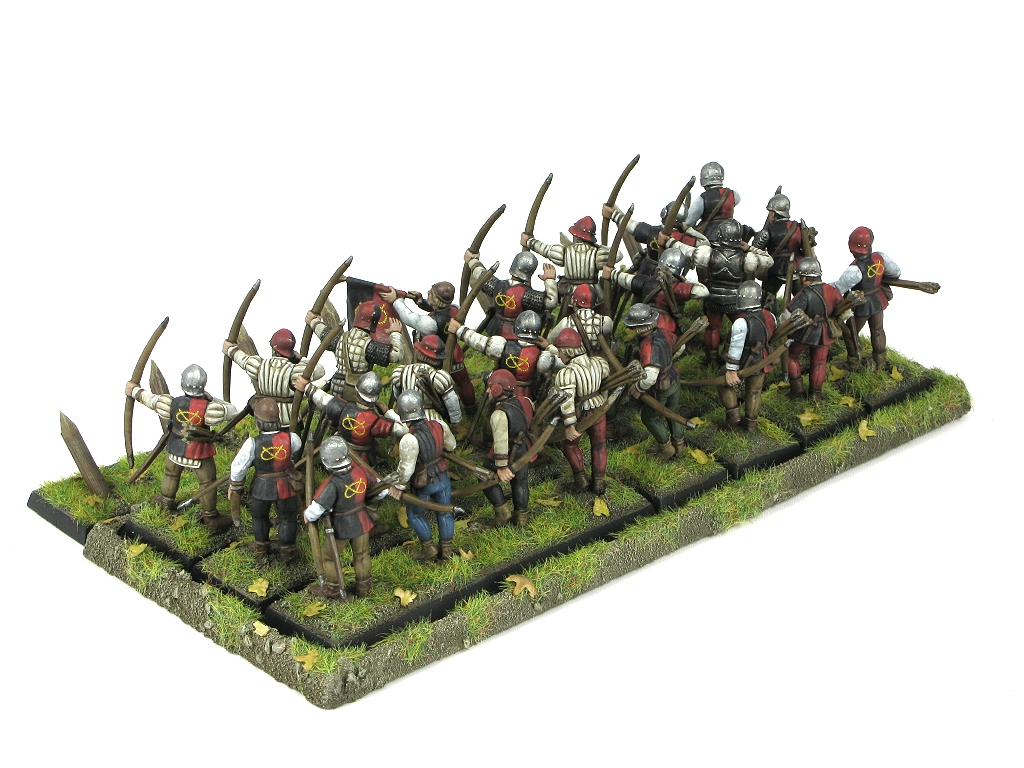

Things to bear in mind:
1) Your printer resolution is the limiting factor on how sharp you can make a decal. Ensure your image is rasterised (made of pixels, not vector) at the same native resolution as your printer. Your art package should allow you to set the physical size / resolution of your image.

2) Decal paper varies. I have nice stuff from craftycomputerpaper.co.uk. I've heard horror stories in particular about very thick white decal paper. Thinner is better.

3) You need to be GOOD at putting on decals. Follow this guide (http://www.winterdyne.co.uk/maz/winterdyne_tutorial3.pdf) and you won't go far wrong. You shouldn't need to seal laser-printed decals. I've not bothered in some time, and I've not really suffered for it. Inkjet printed, then you absolutely MUST seal them.

4) Your printer may not be set to print at full resolution - ensure you've set it to 'best quality' or whatever. Draft prints on expensive decal paper are not fun. TEST BY PRINTING ON NORMAL PLAIN PAPER FIRST. Then put the decal film in (and make sure it's the right way round).


This message was edited 1 time. Last update was at 2014/02/25 15:49:20


Made in au
Fresh-Faced New User


winterdyne wrote:
You've got the right idea.

If you want to put a decal over a strong colour, you need to use a white decal paper and print an appropriate background around the design. (Or use a white-backed decal, or 2 stage process, but white paper is easier).

That's what I did for these - the yellow stafford knot is printed in a rough oval of the appropriate background colour (red or red/black):


Very pretty. I like them a lot, and am inspired by your decals.

winterdyne wrote:

Things to bear in mind:
1) Your printer resolution is the limiting factor on how sharp you can make a decal. Ensure your image is rasterised (made of pixels, not vector) at the same native resolution as your printer. Your art package should allow you to set the physical size / resolution of your image.


This is interesting. I have an advertising guy at work who has helped me with getting the images in some decent format, but he has recommended vector. My assumption here is that it is probably easier to work with getting the colours correct, but from your pearls of wisdom it may not work in the final image. So, I should 'save as' a rasterised image once I've got my masters done in vector?

winterdyne wrote:

2) Decal paper varies. I have nice stuff from craftycomputerpaper.co.uk. I've heard horror stories in particular about very thick white decal paper. Thinner is better.


Yes, I use 'Little Big Men' a lot and find that their decals are quite good, so would be interested in where he gets his decal paper from. The only issue I have with LBM is that they can be fiddly when trying to apply them as they don't slide like other decals so you can't move them once they are put on. Did you find that the decal paper you used from craftycomputerpaper was sticky (like sticky tape) on the side against the model?

winterdyne wrote:

3) You need to be GOOD at putting on decals. Follow this guide (http://www.winterdyne.co.uk/maz/winterdyne_tutorial3.pdf) and you won't go far wrong. You shouldn't need to seal laser-printed decals. I've not bothered in some time, and I've not really suffered for it. Inkjet printed, then you absolutely MUST seal them.


Will look at the tutorial when I get closer to the event, but I'm not overly concerned about my skill. Firstly, the decals will be in an easy place to apply, and I have got a reasonable amount of experience using LBM on getting hoplite shield patterns on hoplons and they worked. Always good to look at other ways of doing things though, so your comments and the tutorial will be appreciated.

winterdyne wrote:

4) Your printer may not be set to print at full resolution - ensure you've set it to 'best quality' or whatever. Draft prints on expensive decal paper are not fun. TEST BY PRINTING ON NORMAL PLAIN PAPER FIRST. Then put the decal film in (and make sure it's the right way round).


I think I'll be using a print outlet to do my final printing. I don't have a colour laser printer, and I'm just a bit nervous about inkjet. Thanks again for your words of wisdom.
   
Made in gb
Longtime Dakkanaut


Nottingham, UK

Rasterising down in the paint program shows you what the printer will produce; at the scale we're talking about, different rasterisation algorithms can produce some wildly different results from the same source image. It's better I've found to have pretty much manual control over that process.

In general, you need a bilinear filter (smoothed) reduction on most images. Over clear though, you need to avoid antialiasing to the back colour; remember that colour blends on most printers are done by stippling; if you don't want the printer to produce a messy edge, ensure that you have 'hard' edges in the print-resolution image.

Sometimes you will find that a particular design does not reduce well, and needs simplifying.


Forum Index » Painting & Modeling Tutorials
Go to:
