Switch Theme:

Help me to learn glow effect.(using a brush)  [RSS] Share on facebook Share on Twitter Submit to Reddit
»
Author Message
Advert


Forum adverts like this one are shown to any user who is not logged in. Join us by filling out a tiny 3 field form and you will get your own, free, dakka user account which gives a good range of benefits to you:
  • No adverts like this in the forums anymore.
  • Times and dates in your local timezone.
  • Full tracking of what you have read so you can skip to your first unread post, easily see what has changed since you last logged in, and easily see what is new at a glance.
  • Email notifications for threads you want to watch closely.
  • Being a part of the oldest wargaming community on the net.
If you are already a member then feel free to login now.


Made in no
Longtime Dakkanaut


Got hold of a few dryads and tought to myself, this would be a nice time to learn something new as they would realy look cool whit yellow glowing eyes.

But, how is this done whitout using airbrush? If i try to google or watch a vid all i see are airbrushes....
maybe i havent been lucky in my searches..

darkswordminiatures.com
gamersgrass.com
Collects: Wild West Exodus, SW Armada/Legion. Adeptus Titanicus, Dust1947. 
   
Made in ca
Fireknife Shas'el


Conceptually, it's not that difficult. Decide where the light is coming from (the eyes, in your case), and put down 'light' where the light source would logically illuminate. The hard part is making this look natural, and airbrushes are actually fairly poor at this, because the paint isn't coming from the light source. It's super easy to over do.

One thing light sources do is that when you look at them, areas that would actually be much brighter than normal look dark because you're looking at a light source. So immediately around the eyes would look darker in the recesses right around the eye, while the cheekbones, nose and eyebrow area would be lit up.

I'm fairly new to doing OSL myself, but I recommend keeping it subtle. Here's some drones I did a small amount of OSL effect; I basically just painted a few lines around the light sources, though I was going for an overall 'force field' effect as well by edge-lighting areas. One thing I tried to do was give the light sources some bright points, but paint the OSL areas in the basic light source color. That should make the light source more intense than the areas it's lighting up.
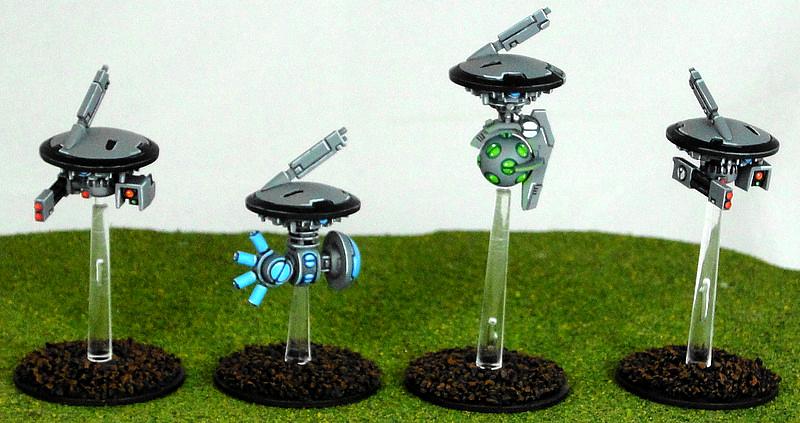


If you're going to try extensive OSL with a brush, I'd say use fairly thin paints and pull the paint toward the light source (surface tension should keep most of the paint with the brush, so it's thinner the further away). Getting the paint just the right thinness will be key here, as you probably want it to be fairly transparent at a distance from the light source.

   
Made in ca
Giggling Nurgling


Long Beach, CA

I really liked this tutorial for the glowing effect. Planning on using this technique for my marines... but maybe not as obvious as his.
   
Made in hr
Dakka Veteran


Croatia

This is how I do it. Choose 2 colours, one brighter and one darker. Paint the centre of the source of the light in the brighter colour, then blend the darker colour towards the edges of the source of the light.
After that just glaze the darker colour on the places you want illuminated. Only illuminate the places where you can draw a line between the illuminated object and the source of the light. Put more glazes the closer the illuminated part is to the source of the light so you have a gradient. Edge highlight any edges with the darker colour where the light hits.

I do commissions:
https://www.playsupport.art/ 
   
 
Forum Index » Painting & Modeling
Go to: