| Author |
Message |
 |
|
|
|
|
Advert
|
Forum adverts like this one are shown to any user who is not logged in. Join us by filling out a tiny 3 field form and you will get your own, free, dakka user account which gives a good range of benefits to you:
- No adverts like this in the forums anymore.
- Times and dates in your local timezone.
- Full tracking of what you have read so you can skip to your first unread post, easily see what has changed since you last logged in, and easily see what is new at a glance.
- Email notifications for threads you want to watch closely.
- Being a part of the oldest wargaming community on the net.
If you are already a member then feel free to login now. |
|
 |
2020/06/09 12:43:18
Subject: Q: Removing screen printed graphics
|
|

Longtime Dakkanaut
|
I have a model, its a slot car if it matters
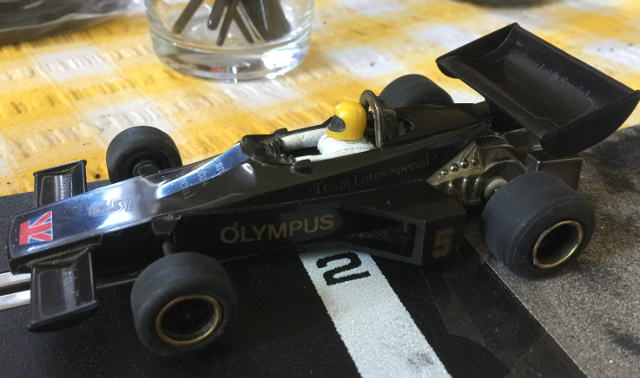
as you can see this is a bit tatty, what I'm wanting to do is remove the screen printed graphics, specifically the gold ones only, to then replace with decals - applying decals isn't a problem.
Q: whats a good way to remove screen printing without doing too much damage to the plastic below?
|
|
|
 |
|
2020/06/09 14:59:23
Subject: Q: Removing screen printed graphics
|
|
Thane of Dol Guldur
|
Why not just paint over it?
|
  Heresy World Eaters/Emperors Children Heresy World Eaters/Emperors Children 
Instagram: nagrakali_love_songs |
|
|
|
|
2020/06/09 18:07:21
Subject: Q: Removing screen printed graphics
|
|
Longtime Dakkanaut
|
the bodywork is black polycarbonate (I think), trying to avoid painting it to avoid uneven bits when it get scratched, it will get a clear varnish coat of some sort. if it comes to it painting may be the only choice but figured it was worth asking if anyone had ideas for removing the graphics from whats currently unpainted plastic
|
|
|
|
|
2020/06/09 22:54:52
Subject: Q: Removing screen printed graphics
|
|
Angry Chaos Agitator
|
I'd try isopropyl alcohol/ rubbing alcohol, I've used it to remove stickers with strong adhesive before so it could be a help. Test it out though on a very small area of plasitc though; i doubt it'll affect it but you don't want to flood the thing with alcohol and accidentally melt it...
|
|
|
|
|
2020/06/10 09:55:40
Subject: Q: Removing screen printed graphics
|
|
Longtime Dakkanaut
|
shmvo wrote:I'd try isopropyl alcohol/ rubbing alcohol, I've used it to remove stickers with strong adhesive before so it could be a help. Test it out though on a very small area of plasitc though; i doubt it'll affect it but you don't want to flood the thing with alcohol and accidentally melt it...
mwhahhhhaaaaa, excellent, will give this a try, will have to polish the polycarb up after anyway (scratched to poo and back in places) so if it takes the shine off I can live with it
many thanks
|
|
|
|
|
2020/06/10 10:20:18
Subject: Q: Removing screen printed graphics
|
|
Blood Angel Terminator with Lightning Claws
|
Those are like heat transfer decals, they should fall off with an alcohol rub,
Thats not polycarbonate, it will be something like abs if its old scalextric
|
 DV8 wrote: DV8 wrote:Blood Angels Furioso Dreadnought should also be double-fisted.
|
|
|
|
|
2020/06/10 17:15:46
Subject: Q: Removing screen printed graphics
|
|
Longtime Dakkanaut
|
 Rybrook wrote: Rybrook wrote:Those are like heat transfer decals, they should fall off with an alcohol rub,
Thats not polycarbonate, it will be something like abs if its old scalextric
sorted, and ta for the material update 
out shopping tomorrow and will try to grab something suitable
|
|
|
|
|
2020/06/10 21:00:43
Subject: Q: Removing screen printed graphics
|
|
Blood Angel Terminator with Lightning Claws
|
They may even chip off with slight rubing, sort of like an old dinky when the paint used to chip off and stick to you fingers
|
DV8 wrote:Blood Angels Furioso Dreadnought should also be double-fisted.
|
|
|
|
|
2020/06/11 14:45:17
Subject: Q: Removing screen printed graphics
|
|
Longtime Dakkanaut
|
Got them off with a bit of rubbing, now needs the plastic polishing back to being smooth before decals go back on.
I had this model (not this exact sample, but one of the same) back when I was about 8, its nice working on something that has to be over 35 years old with the intention of restoring to full working order
and then using it
|
|
|
|
|
|
|