Switch Theme:

How to flatten the transfers on the shoulder pads?  [RSS] Share on facebook Share on Twitter Submit to Reddit
»
Author Message
Advert


Forum adverts like this one are shown to any user who is not logged in. Join us by filling out a tiny 3 field form and you will get your own, free, dakka user account which gives a good range of benefits to you:
  • No adverts like this in the forums anymore.
  • Times and dates in your local timezone.
  • Full tracking of what you have read so you can skip to your first unread post, easily see what has changed since you last logged in, and easily see what is new at a glance.
  • Email notifications for threads you want to watch closely.
  • Being a part of the oldest wargaming community on the net.
If you are already a member then feel free to login now.


Made in gb
Longtime Dakkanaut


Nottingham

I do double slits (two parallel lines about half a mm apart on all the diagonal lines as close to the actual design as I can get, and use Microsol and Microset. I find that the second cuts help it to wrap around the curves of a pauldron much more neatly.
Made in gb
Longtime Dakkanaut


Nottingham

AllSeeingSkink wrote:

 JamesY wrote:
I do double slits (two parallel lines about half a mm apart on all the diagonal lines as close to the actual design as I can get, and use Microsol and Microset. I find that the second cuts help it to wrap around the curves of a pauldron much more neatly.


I wonder if that works better than just cutting the carrier film off entirely like I do.


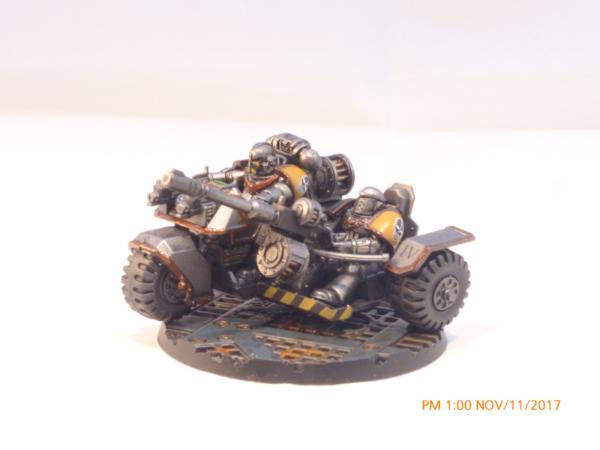
It would depend on the shape I'd have thought. An ultra marine symbol has a big hollow that can accommodate a lot movement, so your way would work better. When I did my iron warriors, I had to cut slightly into the design to create enough opportunity for the decal to mould to the curves and lie flat. The double cuts helped it spread in a way that I didn't then need to touch up anything with paint as there were no 'steps' where the cuts were.

If you zoom in on the pauldrons on this picture, you can see how flat they've ended up doing this;
This message was edited 1 time. Last update was at 2023/01/28 09:57:51


Forum Index » Painting & Modeling
Go to: