Switch Theme:

Looking for a painting tip  [RSS] Share on facebook Share on Twitter Submit to Reddit
»
Author Message
Advert


Forum adverts like this one are shown to any user who is not logged in. Join us by filling out a tiny 3 field form and you will get your own, free, dakka user account which gives a good range of benefits to you:
  • No adverts like this in the forums anymore.
  • Times and dates in your local timezone.
  • Full tracking of what you have read so you can skip to your first unread post, easily see what has changed since you last logged in, and easily see what is new at a glance.
  • Email notifications for threads you want to watch closely.
  • Being a part of the oldest wargaming community on the net.
If you are already a member then feel free to login now.


Made in gb
Regular Dakkanaut


Hey Dakka's

I'm beginning to start painting my Ogres soon and I am going along with a winter theme (original i know) but what I am asking for is help painting a white fur effect. Instead of buying the Sabertusk models from GW I will be using my WoC hounds as I have about 6 I am not using and saying they're winter wolves
I have never painted a winter theme before and it has taken me some time to practice making the desired Snow effect. I intend on using the snow fur effect on my Sabertusks, Mournfang and eventually my Stonehorn.
If anyone with experience on this could kindly provide a few pointers I'd greatly appreciate it!

Kind Regards
Mike

This message was edited 1 time. Last update was at 2013/11/25 20:28:11


Made in gb
Avatar of the Bloody-Handed God


Inside your mind, corrupting the pathways

If you want something like snow leopard fur, you can get that kind of effect by undercoating white, then using a watered down black wash and placing a small dot on the model - then quickly adding a dot of clean water in the centre - this will spread out the black wash and hopefully leave a clearer centre showing through the white undercoat.

You could add stripes instead of spots, use the same weak black wash but draw it down into stripes rather than dotting it on.

Once dry you can then add on the appropriate tone colours - for the slightly yellow colour I would use a very weak sepia wash. For the white colour I would go for an extremely weak black wash (possibly adding a small amount of blue).

You can mix this up a bit by adding a very weak blue wash to shift the whole model over towards the blue spectrum which will make it look colder.

If you want to avoid the spots/stripes, you can skip that step and hit the model with a very weak blue wash, then a weak sepia over the top of the model.

   
Made in gb
Regular Dakkanaut


thanks a lot Silver! greatly appreciate the fast response
   
Made in gb
Avatar of the Bloody-Handed God


Inside your mind, corrupting the pathways

No problem - I love washes and regularly "paint" entire models using nothing but

Spoiler:


Made in gb
Regular Dakkanaut


Nicely done! don't suppose I could haggle you for more ideas. Have you ever watched Game of Thrones?
I'm looking to paint my oges in a White walkers theme. Or possibly a Frost Giant blue (Thor reference)

any ideas?

ill re edit this with pictures in a sec


Automatically Appended Next Post:
http://highlighthollywood.com/wp-content/uploads/2013/06/GOT-WhiteWalker-3.png
^
white walkers

http://ascribblersdreams.files.wordpress.com/2012/09/thor-frost-giants_528_poster.png
^
Frost giants

This message was edited 2 times. Last update was at 2013/11/25 21:03:21


Made in gb
Avatar of the Bloody-Handed God


Inside your mind, corrupting the pathways

I've not seen Game of Thrones - interested in doing so but never been in the right place at the right time to catch any of it

For White Walkers I would undercoat white, then probably go with a very light black wash, then when dry a very light blue wash - possibly with some drybrushing in white over the top since you want a quite messy/furry look. Might then, depending on how it looked, hit it again with a very, very light blue or black wash just to tie the drybrushing back in to the rest of the model again. Edit: Having looked at your image above they look less blue than in my picture, so would probably hit it with black rather than blue.

The eyes I would hit the entire eye socket with a slightly heavier blue wash, then when dry hit the eyes with a blue ink (as it has a gloss finish). I then might get a really, really, really, watered down drop of white paint (basically a white wash ) and then hit the eyes again so you get a nice white rim around the eyeball itself.


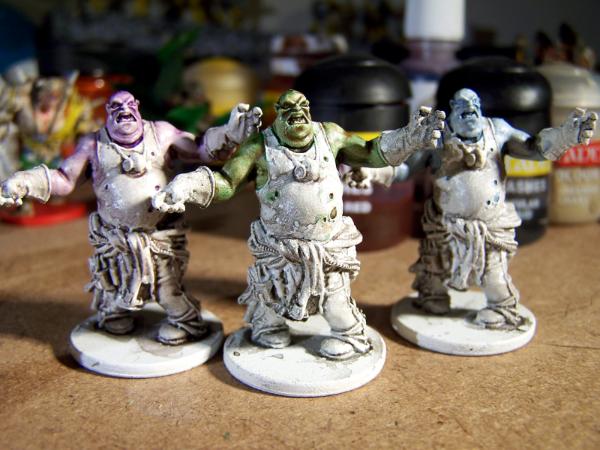
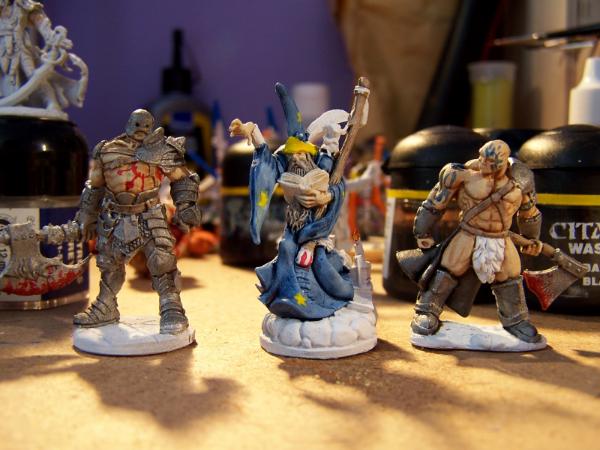
For the frost giant skin I would go with what I did for the fatty zombie above - a light black wash, then a regular strength (possibly slightly watered down to be on the safe side) blue wash (can always make it darker with another wash over the top!).

You can add things like tattoos easily by pre-painting them before washing - gives the added bonus of not having to strip and redo lots of work if you mess it up.

Example:
Spoiler:


The barbarian on the right had a blue wash applied over a white undercoat and then sepia added for the skin. The barbarian on the left had the same except with a red ink (as red washes tend to be too wishy washy for bright colours - inks are much better for this and putting another wash over the top kills the gloss).

If you want to have a look at some other stuff I have done, check out my PLog - need to update it as I did some painting over the last couple of weekends while I was home

This message was edited 1 time. Last update was at 2013/11/25 21:16:22


Made in gb
Regular Dakkanaut


ah well i really appreciate your help with my question Silver!

I suspect the image i gave you with the "frost giants" were a lot darker. but on the nig screen its a fairly dark blue almost navy.

I was thinking the was was the right approach. Though my limited supply of paints led me to use Ragal Blue with the armour wash/badab black wash.

Thanks again Silver! when I start painting them ill drop you a PM with the results
   
 
Forum Index » Painting & Modeling
Go to: