Switch Theme:

Looking for a good complementary color (basing)  [RSS] Share on facebook Share on Twitter Submit to Reddit
»
Author Message
Advert


Forum adverts like this one are shown to any user who is not logged in. Join us by filling out a tiny 3 field form and you will get your own, free, dakka user account which gives a good range of benefits to you:
  • No adverts like this in the forums anymore.
  • Times and dates in your local timezone.
  • Full tracking of what you have read so you can skip to your first unread post, easily see what has changed since you last logged in, and easily see what is new at a glance.
  • Email notifications for threads you want to watch closely.
  • Being a part of the oldest wargaming community on the net.
If you are already a member then feel free to login now.


Made in de
Liche Priest Hierophant


Hey folks, I'm a little stuck on my basing for Age of Sigmar and would appreciate some opinions.

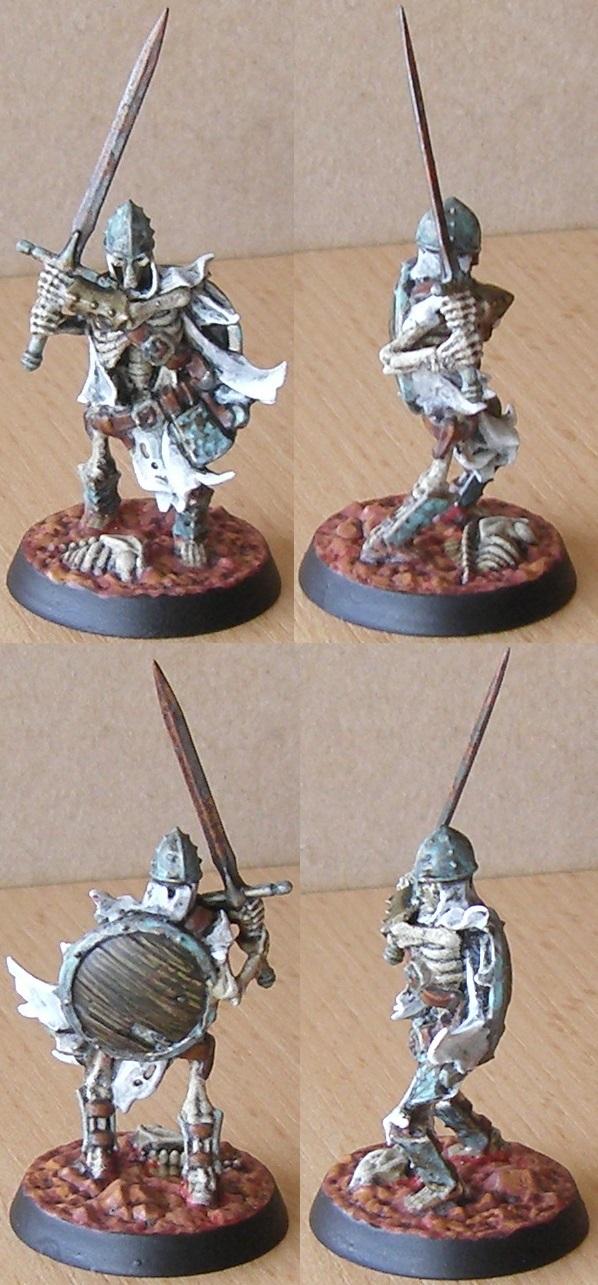
I've decided to do red dirt and bone as the unifying colors on my bases, as seen on the skeleton below, because those two things will feature on every model.. The thing is, with so many models coming with scenic bases these days I get all manner of additional stuff on bases, the most prominent of which are rocks and stonework. The problem is, I don't have a clue what to do with these.

Anybody got any suggestions?


Nehekhara lives! Sort of!
Why is the rum always gone? 
   
Made in gb
Angry Chaos Agitator


I think the red dirt looks great with the model (nice paint job on him too), and I'd try and keep that colour in the bases where possible. You could get yourself some dry pigment that's a similar colour, and add it as a layer of red dust over anything on the base, with a strong focus in the recesses.

That way you could pick out the rocks and stonework in grey/ beige or whatever, and still have that red colour be the unifying feature.

This message was edited 1 time. Last update was at 2019/04/23 09:19:30


Made in de
Longtime Dakkanaut


The base should be a contrast to the model. That means different colour, sheen, surface texture than the model.

Your mini has cold, light colours and is smooth. Your base has warm colours and is darker. It is however almost as smooth as the model since your grit is very rough compared to the model. Yet, with two out of three you get good separation.

Things you can have a look at are basing kits (from GW or others) with static grass clumps or decorative elements. You may also consider material meant for model train setups as base deco, for example their plant offering.

A very popular option are texture rolling pins from Greenstuffworld, available in many themes. These can shape expensive model clay (Sculpy) or cheap air-drying modelling clay from Discounters sich as Action in patterns that suit your army's theme. The resulting plates are then broken into shards and glued to the base as decoration. Tip, make sure they are thin and sand them at an angle to avoid them all being parallel to the ground.

Finally, there are many kits out there that are offering different themes of base deco, suitable for larger bases.

   
Made in de
Liche Priest Hierophant


Thanks, guys!

Red dust on top and in recesses sounds like an excellent idea. I'll give that a try immediately. That may just be what I've been looking for.

Aside from the seven Shadespire skeletons I'm only planning to paint characters for the next while, which have a variety of bases. I'll try to get some of those painted before I look into adding static grass. If they appear coherent enough, I may not want to overload their bases with more stuff, but if they need more common elements, I may give static grass a try.

Greenstuffworld has leaf making tools, yes? Has anybody tried these? Are they any good? A couple of fallen leaves might add a nice touch to the models. I could sculpt them by hand, but that might get tedious in the long run.

Side note: I forgot to oxidize his bracer. Right then, that's fixed now.

Nehekhara lives! Sort of!
Why is the rum always gone? 
   
 
Forum Index » Painting & Modeling
Go to: