| Author |
Message |
 |
|
|
|
|
Advert
|
Forum adverts like this one are shown to any user who is not logged in. Join us by filling out a tiny 3 field form and you will get your own, free, dakka user account which gives a good range of benefits to you:
- No adverts like this in the forums anymore.
- Times and dates in your local timezone.
- Full tracking of what you have read so you can skip to your first unread post, easily see what has changed since you last logged in, and easily see what is new at a glance.
- Email notifications for threads you want to watch closely.
- Being a part of the oldest wargaming community on the net.
If you are already a member then feel free to login now. |
|
 |
2011/08/31 02:28:28
Subject: Anyone got some tips for taking pictures of models?
|
|

Unfortunate Ungor
|
I've got a whole lot i'd like to show off but errr i suck at taking good pictures, as this one will demonstrate...
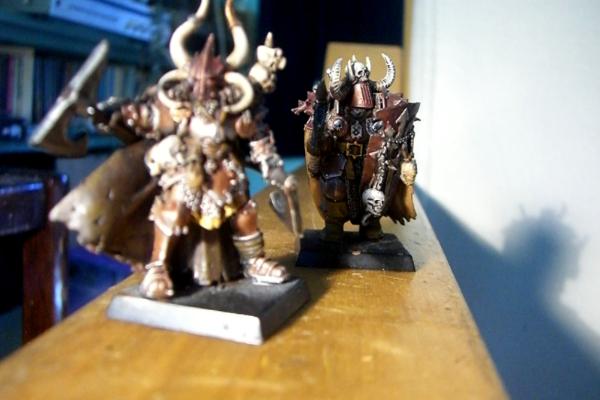
Wondered if anyone had some hints at how to not fail at photographing minis? Automatically Appended Next Post: Also, i apparently fail at posting things in the right forum 
|
|
This message was edited 1 time. Last update was at 2011/08/31 02:29:17
|
|
|
 |
|
2011/08/31 04:54:44
Subject: Anyone got some tips for taking pictures of models?
|
|

Hungry Little Ripper
Prince George, BC, Canada
|
oh man i am horrible at photographing models too What camera are you using? I sometimes try with my ipod but those all turn out terrible...I have tried using my friends flipcam and those turned out ok, not perfect but good enough to see the detailing... I recommend setting up a little light coloured 5-sided photoshoot box for taking the pictures, you can usually find one for around 50-60 dollars that includes two spotlights and a stand  BTW BTW that is a pretty amazing paintjob on the one in the back, really like the colour scheme
|
|
This message was edited 1 time. Last update was at 2011/08/31 04:56:01
|
|
|
|
|
2011/08/31 05:42:30
Subject: Re:Anyone got some tips for taking pictures of models?
|
|

Last Remaining Whole C'Tan
|
We actually have a category here with several articles on the topic. The big one is adjusting your macro setting.
This article in particular has a lot of great info.
So far as posting to the right forum, don't worry about it, it can be fixed. Create a new thread introducing yourself in this forum(welcome to Dakka, by the way!).
I've reported this post, and a helpful mod will move it for you to the Paint & Modelling forum (most likely). If you can't find it, then click your name at the top of the screen and then click on "messages posted" to find it. The Painting & Modelling forum is a fantastic resource for anyone looking to improve their skills or just show off.
|
|
This message was edited 2 times. Last update was at 2011/08/31 05:46:07
 lord_blackfang wrote: lord_blackfang wrote:Respect to the guy who subscribed just to post a massive ASCII dong in the chat and immediately get banned.
 Flinty wrote: Flinty wrote:The benefit of slate is that its.actually a.rock with rock like properties. The downside is that it's a rock
|
|
|
|
|
2011/09/06 13:21:00
Subject: Anyone got some tips for taking pictures of models?
|
|
Unfortunate Ungor
|
Thanks Guys, since i posted this i have had a better look around and found the articles you referred me to XD
i'm using a casio Exlim 5 mega pixel, its fairly old.
it does have a macro setting but it never seems to bring what i want in to focus. I have literally dozens of shots like this, where the model in the foreground is blurred but everything behind it comes out beautifully. Distance doesn't seem to make a difference either...
Thanks for the feedback Imperion. I'm using the same scheme on the whole army, going for as much rusted metal as i can without it looking too Nurglesque...
|
|
|
|
|
|
2011/09/06 13:37:54
Subject: Anyone got some tips for taking pictures of models?
|
|
Longtime Dakkanaut
|
The camera probably has an autofocus. It'll be looking for the most apparent feature in frame. Solve this by using a backsheet. Plain paper can work, but you'll generally find a gradient backdrop (blue-to-white) will help your camera get a white fix, which can help with colour balancing.
Backsheet, good light, tripod are the holy trinity. Macro does help, but it's the first three that IMO are key.
|
|
|
|
|
|
2011/09/06 13:59:20
Subject: Anyone got some tips for taking pictures of models?
|
|
Last Remaining Whole C'Tan
|
CrimsonHammer wrote:i'm using a casio Exlim 5 mega pixel, its fairly old.
it does have a macro setting but it never seems to bring what i want in to focus. I have literally dozens of shots like this, where the model in the foreground is blurred but everything behind it comes out beautifully. Distance doesn't seem to make a difference either...
5MP should be plenty. You don't really need a high-end camera to take good pictures. What's the exact model (EX-something?). I'll see if I can find the user guide.
How far away is the camera from the miniature?
|
lord_blackfang wrote:Respect to the guy who subscribed just to post a massive ASCII dong in the chat and immediately get banned.
Flinty wrote:The benefit of slate is that its.actually a.rock with rock like properties. The downside is that it's a rock
|
|
|
|
|
2011/09/06 14:10:42
Subject: Re:Anyone got some tips for taking pictures of models?
|
|
Dakka Veteran
|
This mini was photographed using my mobile phone.. get a selection on different coloured bck grounds .. never use direct sunlight as it will kill the shadows and highlights.. I always shot with the light source coming from behind but experiment...! here'sa few of my pics
|
|
|
|
|
2011/09/10 00:08:06
Subject: Anyone got some tips for taking pictures of models?
|
|
Unfortunate Ungor
|
first, those are some stunning models and second, mobile phone cameras must have improved a lot since i last had one xD
seriously though, That Yarrick is one of the best i've seen, i particularly like the sword hilt, and have you used a matte varnish on that black? i'm really liking how its highlighted without looking glossy, something i'm trying and failing to achieve on beastmen/minotaur skin.
|
|
|
|
|
|
2011/09/11 18:03:30
Subject: Anyone got some tips for taking pictures of models?
|
|
Unfortunate Ungor
|
Eh this thread is pretty much dead.
I've been using the box a unit came in with the top and short side cut off, lined with tacked on white plasticard and an overhead halogen lamp with a piece of paper tacked over it to diffuse the light a bit. Been producing decentish results, although it doesn't do well for dark colours.
Thanks for all the feedback, and Ouze i worked out how to use the marco feature properly, thanks anyway.
|
|
|
|
|
|
|
|


