Switch Theme:

Having an issue with painting faces  [RSS] Share on facebook Share on Twitter Submit to Reddit
»
Author Message
Advert


Forum adverts like this one are shown to any user who is not logged in. Join us by filling out a tiny 3 field form and you will get your own, free, dakka user account which gives a good range of benefits to you:
  • No adverts like this in the forums anymore.
  • Times and dates in your local timezone.
  • Full tracking of what you have read so you can skip to your first unread post, easily see what has changed since you last logged in, and easily see what is new at a glance.
  • Email notifications for threads you want to watch closely.
  • Being a part of the oldest wargaming community on the net.
If you are already a member then feel free to login now.


Made in us
Savage Khorne Berserker Biker


Tampa, FL

Take a look here at my WIP Librarian (which I tidied up a little after this pic was taken):
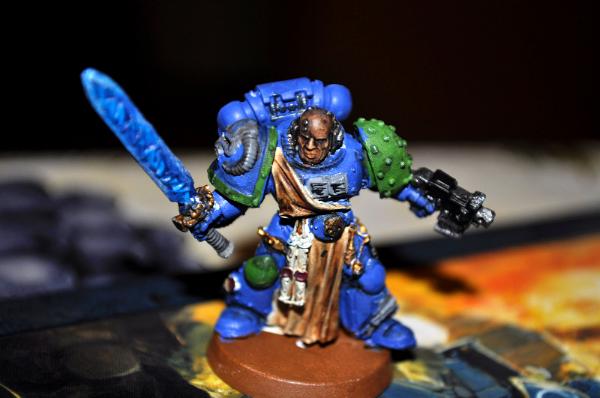


The issue I'm having is with the proper placement of Devlan Mud. I don't have much paint-wise for faces as I mainly paint Orks, so the only paints I have at hand ATM are Elf Skintone (VGC; Elf Flesh in GW) and the Devlan Mud wash.

How should I go about painting his face with what I have available?


Made in ie
Crazed Gorger


Ireland

There is an article on the GW website about how to paint faces such as caucasian etc and alot more although you have to sign up but that no biggie then you download the pdf

'The One Who Doesn't Fall, Doesn't Stand Up'
-Fedor Emelianenko 31-3-1 The Greatest Heavyweight ever
 
   
Made in ie
Longtime Dakkanaut


You can do this no problem with the paint you have.

Base it in elf flesh, then give it a light mud wash, talking 1:1 wash to water mix. Rehighlight with the same elf flesh, then add a small amount of white to it and add the last highlight.

A final wash of say 2:1 water to devlin will be good to blend it together, but if you have ogryn flesh or some sepia to mix into the devlin that will be the way to go.


Forum Index » Painting & Modeling
Go to: