| Author |
Message |
 |
|
|
|
|
Advert
|
Forum adverts like this one are shown to any user who is not logged in. Join us by filling out a tiny 3 field form and you will get your own, free, dakka user account which gives a good range of benefits to you:
- No adverts like this in the forums anymore.
- Times and dates in your local timezone.
- Full tracking of what you have read so you can skip to your first unread post, easily see what has changed since you last logged in, and easily see what is new at a glance.
- Email notifications for threads you want to watch closely.
- Being a part of the oldest wargaming community on the net.
If you are already a member then feel free to login now. |
|
 |
2013/11/14 02:37:05
Subject: How do I paint Salamander skin that doesnt look fake?
|
|

Been Around the Block
|
As the title says I don't know what to do with my salamanders skin. I've painted some stuff already and I'm happy with my salamanders thus far, but I've been avoiding the ones without helmets as long as I could. I'm aware that the fluff says "jet black" and that some of the older stuff has them colored with A more natural Brown skin tone. That said, I feel like most of the pictures Ive seen with pure black skin look really awful and to go with a natural brown skin tone seems like a complete cop out as the fluff describes it as completely unnatural looking or almost daemonic.
I guess what I'm picturing Is a natural flesh color base with a greyish black undertone? maybe even a Deep brown but certainly closer to black. By chance has anyone done anything similar to this that can give me some pointers? Where to start? Maybe some pictures of unnaturally darkened flesh with an explanation of how to achieve the color? I am not a tremendously skilled painter and perhaps I'm biting off more than I can chew here, but I do have steady hands, a basic understanding of highlighting and shading, and tons of free time to paint. any advice is appreciated!
|
|
|
 |
|
2013/11/14 03:15:50
Subject: Re:How do I paint Salamander skin that doesnt look fake?
|
|
Drakhun
|
|
|
|
|
|
|
2013/11/14 05:39:21
Subject: How do I paint Salamander skin that doesnt look fake?
|
|
Boosting Ultramarine Biker
|
Years ago I painted a British colonial army and Zulu army in 25mm. A very convincing job can be done very simply for black skin with two colors. For the Zulus, I painted them black, then dry brushed with a chocolaty brown. When viewed from several feet away, on the table, it looked like black skin. If you can dry brush decently, give it a try.
|
|
|
|
|
2013/11/14 07:30:18
Subject: How do I paint Salamander skin that doesnt look fake?
|
|

Steadfast Grey Hunter
|
Go for a natural flesh tone then a couple of heavy washes of nuln oil. I did some a few years back that way and it worked out pretty well.
|
|
|
|
|
2013/11/14 13:48:23
Subject: How do I paint Salamander skin that doesnt look fake?
|
|
Been Around the Block
|
thanks for the quick responses guys. I'll give all of those a shot and see what I like best
|
|
|
|
|
2013/11/14 17:07:39
Subject: Re:How do I paint Salamander skin that doesnt look fake?
|
|

Grey Knight Purgator firing around corners
|
Darker to lighter layer (names are for VMC):
Black Brown
Chocolate Brown
1:1 Chocolate Brown : US Tan Earth
US Tan Earth
1:3 Brown Rose : Cork Brown
Basic Skintone
You may avoid the "lighter" ones to achieve darker skin tone, I'd say skipping the last two
Last line is mine, recipe is from Cmon.
|
 2270 (1725 painted) 2270 (1725 painted)
 1978 (180 painted) 1978 (180 painted)
 329 (280ish) 329 (280ish)
 705 (0) 705 (0)
 193 (0) 193 (0)
 165 (0) 165 (0)
:assassins: 855 (540) |
|
|
|
|
2013/11/14 22:57:09
Subject: How do I paint Salamander skin that doesnt look fake?
|
|
Courageous Space Marine Captain
|
I use this
1:1 Mix Calthan Brown and Undercoat Black
Wash Agrax Earthshade
to achieve this
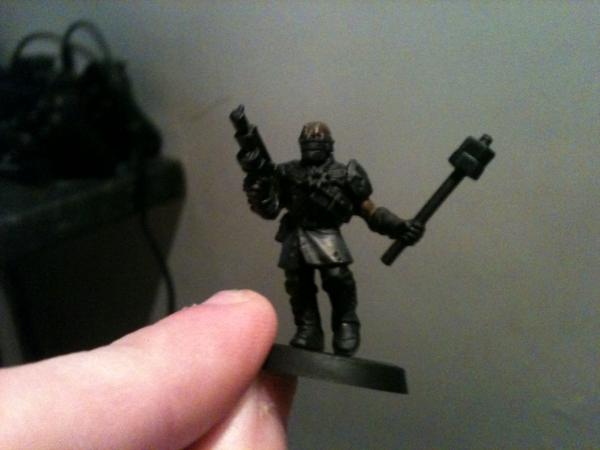
Its a very dark brown skin colour and another round of black in the mix or a few more Earthshade washes and you should have it nicely.
|
I'm celebrating 8 years on Dakka Dakka!
I started an Instagram! Follow me at Deadshot Miniatures!
DR:90+S++G+++M+B+IPw40k08#-D+++A+++/cwd363R+++T(Ot)DM+
Check out my Deathwatch story, Aftermath in the fiction section!

Credit to Castiel for banner. Thanks Cas!
|
|
|
|
|
|
|


