| Author |
Message |
 |
|
|
|
|
Advert
|
Forum adverts like this one are shown to any user who is not logged in. Join us by filling out a tiny 3 field form and you will get your own, free, dakka user account which gives a good range of benefits to you:
- No adverts like this in the forums anymore.
- Times and dates in your local timezone.
- Full tracking of what you have read so you can skip to your first unread post, easily see what has changed since you last logged in, and easily see what is new at a glance.
- Email notifications for threads you want to watch closely.
- Being a part of the oldest wargaming community on the net.
If you are already a member then feel free to login now. |
|
 |
2007/11/15 13:17:33
Subject: DAKKA DAKKA FAQ - Please read this thread before posting any questions
|
|

[ADMIN]
Decrepit Dakkanaut
|
This is the Dakkadakka.com FAQ. It will be regularly updated to answer questions that are posted in this thread and across the rest of the forum. If you do not see your question represented in this thread after reading through it, please don't hesitate to post your question here. Question posts will be removed as I collect your question (to help keep this thread easy to read). An answer to that question will then eventually be posted here in this thread.
All of the question titles in this post are actually quick links to the appropriate Question & Answer. So when you see a question that matches what you're wondering, click on it and read away!
DAKKA PROFILE QUESTIONS
Q: I'm having trouble logging onto my account, why isn't my password working?
Q: How do I upload an Avatar, add a website address to my account or make any other kinds of changes to my Dakka profile?
Q: What exactly is my Rank and when does it improve?
Q: Other users have cool army-specific ranks under their name, how do I get one of those?
Q: The little flag that appears next to each of my posts doesn't display the country I'm actually from. How do I change that?
Q: Can I change my user name or delete my Dakka account and start over again?
DAKKA SETTINGS QUESTIONS
Q: How do I change the timezone settings so Dakka will display my timezone? What timezone is Dakka on by default?
Q: How do I disable the post preview function that occurs when I move my mouse over topics in the forum?
DAKKA PICTURE & GALLERY QUESTIONS
Q: How do I submit pictures to the Dakka gallery?
Q: How do I insert pictures into my forum posts?
Q: How do I get my images from the Dakka gallery into my forum posts?
Q: Am I allowed to directly link my pictures in the Dakka Gallery onto other website forums?
Q: If I attach pictures to my Dakka posts, how can I arrange the images throughout the post instead of having them clumped all at the bottom?
Q: How do I get my pictures displayed on the Dakka front page?
DAKKA CONTACT & SERVICES QUESTIONS
Q: Where do I leave feedback about the site or ask questions about technical issues?
Q: Where can I suggest additions to the Dakka glossary, army rank tracks and the funny sayings at the top of each page?
Q: How do I contact the site administrator via email?
Q: How can I get my advertisement on Dakka?
Q: What is a DCM and how do I become one?
Q: How do I submit an article to the site?
DAKKA POSTING QUESTIONS
Q: Where can I find the list of rules I have to abide by when posting in the forums?
Q: How do I notify a moderator about a particular post?
Q: In the text editor screen, what does the "Code" Button and [ code ] [ /code ] tags do?
Q: How exactly does the 'Multi-Quote' feature work? It doesn't seem to do anything for me.
Q: How do I delete one of my own posts?
Q: What is 'thread necromancy' and why is it bad?
Q: Is it okay to talk about or show pictures of recasted models?
Q: Is it okay to post page scans of unreleased rules and/or pictures of unreleased models?
|
|
This message was edited 66 times. Last update was at 2017/08/22 00:42:18
|
|
|
 |
|
2007/11/15 13:17:45
Subject: Re:DAKKA DAKKA FAQ - Please read this thread before posting any questions
|
|
[ADMIN]
Decrepit Dakkanaut
|
Q: I'm having trouble logging onto my account, why isn't my password working?
A: When the site switched to new forum software in November 2007, all user passwords were reset as a security precaution. When you attempt to log-in for the first time on the new forum software it will ask you to click on a text link to 'change your password'.
When you click on this link you will have the option to either enter your username or your email address (that is on record in your Dakka account) and then an email will be sent to the email address on record in your Dakka account.
Follow the instructions provided in the email in order to access your account and create a new password. Anytime you forget your user password you can utilize this feature by going to the login page and clicking on the 'I lost my password' link.
Just make sure you check and appropriately adjust the spam/junk mail filter settings on your email account as they may automatically filter or block our emails from reaching you (our automated emails are sent from machinegod@dakkadakka.com if you need to unblock the sender address).
If the email address on record in your Dakka account is no longer valid, if you are having issues with the activation email or you just have questions in general, please send us an email at:
webmaster@dakkadakka.com
In order for us to manually change your password you will have to provide us with the (now defunct) email address that is on file in your Dakka profile. If you can't remember what your old email address was anymore, you will need to start a brand new profile!
Jump back up to the list of Frequently Asked Questions.
|
|
This message was edited 7 times. Last update was at 2009/08/14 05:45:12
|
|
|
|
|
2007/11/15 13:17:55
Subject: Re:DAKKA DAKKA FAQ - Please read this thread before posting any questions
|
|
[ADMIN]
Decrepit Dakkanaut
|
Q: How do I upload an Avatar, add a website address to my account or make any other kinds of changes to my Dakka profile?
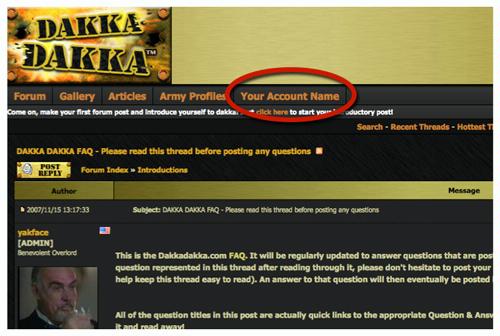
A: To make any kinds of changes to your Dakka profile, including adding an Avatar, changing any of your profile settings, etc, scroll up to the top of the page and click on your profile link at the top left below the Dakka logo (on your screen your profile name will be displayed instead of 'Your Account Name'):
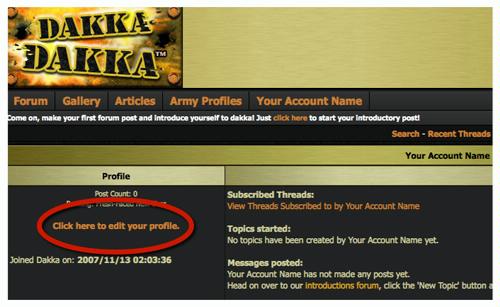
This will take you to your profile page. From there you want to click on the 'Click here to edit your profile' link:
This will get you to your profile edit page where you can change all sorts of personal settings and add unique items to your profile.
To add an Avatar to your profile scroll down to the bottom of your profile page and click on the 'Browse' button:
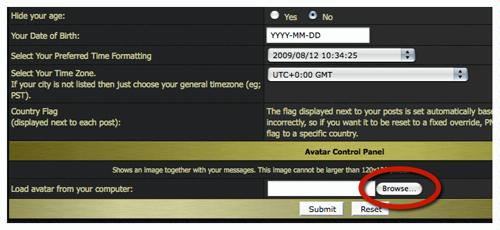
Then select an image off of your local computer to upload to your profile. Your Avatar picture is hosted by us (for free) and will automatically be resized to a proper height and width. Click 'Submit' at the bottom of the page and your Avatar will now appear next to all of your posts!
Jump back up to the list of Frequently Asked Questions.
|
|
This message was edited 7 times. Last update was at 2009/08/14 05:46:01
|
|
|
|
|
2007/11/15 13:18:03
Subject: Re:DAKKA DAKKA FAQ - Please read this thread before posting any questions
|
|
[ADMIN]
Decrepit Dakkanaut
|
Q: Other users have cool army-specific ranks under their name, how do I get one of those?
A: Dakka gives you the ability to have your post rankings based on your favorite army/race from several popular miniature games. To choose your army rank, you need to edit your profile. Once there, scroll to the bottom of your edit profile page and access the 'Choose a ranking track' drop-down menu:
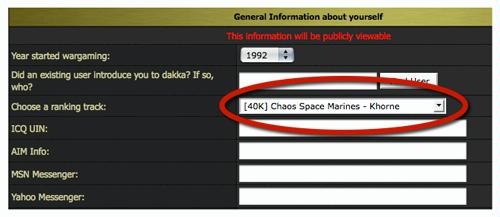
Choose whatever army or race you please and click the 'Submit' button at the bottom of the page. Your new army-based post rank will immediately appear under your user name in your posts.
Feel free to change your army rank track as often as you'd like.
If that still isn't enough for you, DCMs have the option to create their own custom rank. Consider becoming a DCM today and help to keep Dakka running and improving.
Jump back up to the list of Frequently Asked Questions.
|
|
This message was edited 11 times. Last update was at 2009/08/14 05:46:39
|
|
|
|
|
2007/11/15 14:41:08
Subject: Re:DAKKA DAKKA FAQ - Please read this thread before posting any questions
|
|
[ADMIN]
Decrepit Dakkanaut
|
Q: How do I change the timezone settings so Dakka will display my timezone? What timezone is Dakka on by default?
A: Dakka's clock runs on the Greenwich Mean Time (GMT), which is +5 hours ahead of EST and +8 hours ahead of PST. So when it is midnight in EST, it is 8am in GMT.
To change your clock (or any other kind of change to your Dakka profile), you need to edit your profile.
On your edit profile page scroll down and click on the drop down menu for "Select your timezone":
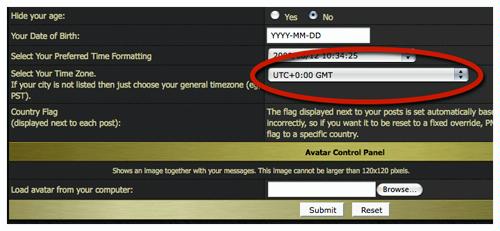
Once you've selected the appropriate timezone, don't forget to click the 'submit' button at the bottom of the page.
Jump back up to the list of Frequently Asked Questions.
|
|
This message was edited 8 times. Last update was at 2009/08/14 05:47:33
|
|
|
|
|
2007/11/15 14:54:42
Subject: Re:DAKKA DAKKA FAQ - Please read this thread before posting any questions
|
|
[ADMIN]
Decrepit Dakkanaut
|
Q: How do I disable the post preview function that occurs when I move my mouse over topics in the forum?
A: To disable post previews (or any other kinds of changes to your Dakka profile), you need to edit your profile.
On your edit profile page scroll down to the 'Disable post preview popups' item and select 'Yes':
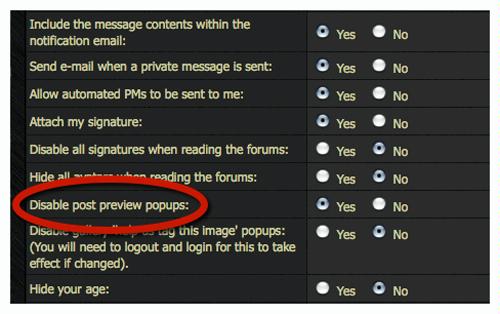
Then click the 'submit' button at the bottom of the page.
Jump back up to the list of Frequently Asked Questions.
|
|
This message was edited 6 times. Last update was at 2009/08/14 05:47:59
|
|
|
|
|
2007/11/15 15:38:37
Subject: Re:DAKKA DAKKA FAQ - Please read this thread before posting any questions
|
|
[ADMIN]
Decrepit Dakkanaut
|
Q: How do I insert pictures into my forum posts?
A: There are two main ways to get your pics into your posts on Dakka, but you first must understand that you can't just link to pictures off of your computer onto the internet. Instead, pictures must be uploaded to a hosting service first. Once your pictures are hosted online somewhere, you can then link to those photos and have them displayed elsewhere on the internet.
The best (and cheapest) way to get pictures into your posts on Dakka is to have us host your pictures for you at absolutely no cost to yourself! There are two ways to do this:
#1A) The easiest way to have Dakka host your pictures is to upload them to the gallery and then once your pictures are in the gallery you can then link those pictures into your forum posts. Click here for more information on how to link gallery pictures into your forum posts.
#1B) You can also have Dakka host your pictures by simply attaching them to your forum posts. At the bottom of the text editor screen (what you see when you're typing up a post) there is a tab for 'attachments'.
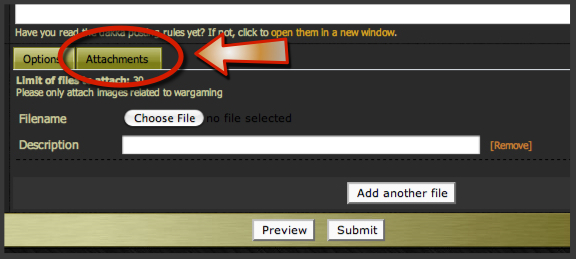
If you click on this tab you will see a button to 'choose file' for pictures on your local computer. Select the picture you want to upload from your computer and then finish submitting the post and *viola* your picture will now be displayed at the bottom of your post for all the world to see!
You can attach up to 30 pictures into each post and Dakka will automatically resize your pictures to properly fit into our forum. When attaching the picture to your post you will notice a 'Description' field. I highly recommend putting as much detail about your picture into this description as you can. Not only will the description appear below the picture in the post, but attached pictures in many of our forums are automatically uploaded to our Gallery, and the more information you provide about each picture the easier it will be for people to search and find your picture in the gallery.
For example, if you have a series of pictures of your Defiler, for the picture that shows the front of the model you should (at the very least) put: 'Defiler front'. Other useful details would include the army/race it comes from ('Chaos') and the game it is for (' 40K').
All pictures displayed in Dakka posts must be wargaming related and may not contain graphic or copyrighted images. Please remember this is a family-friendly forum. If you are ever in doubt, please contact one of the forum mods or administrators for clarification on whether your picture is acceptable or not. Attached improper images on your forum posts will be deleted without warning and may result in a suspension of your account.
If you're interested in displaying one of your attached pictures into a different thread (or onto another site), click here for information on how to do that.
#2) The second way to get your pictures into your posts on Dakka is to have someone else host your pictures and then directly link to those hosted pictures. There are numerous picture hosting services on the internet. Some cost money while others offer free services (you'll need to check them out yourself to see which one is right for you). Some of the more popular sites are: 'photobucket' and 'flickr' (but there are many, many more).
Be aware that some of these sites (especially the ones that offer free services) don't allow you to directly link to your pictures, meaning you can post a link to your picture but you won't be able to actually directly insert a picture into your post.
If your hosting service does offer direct linking, copy the web address of the picture (the easiest way to do that is to open the picture in its own window and then copy the web address from the windows address bar) and paste it directly into the text entry field of your post. Highlight the address you just pasted and click the 'IMG' button (found above the text entry field). The address will now be surrounded by [ img ] and [ /img ] tags on either side (but without the spaces between the letters and the brackets). These are the tags needed to paste a picture into your post (you could manually type out these tags if you felt like it). Once you submit your post you should now see your picture appear, huzzah!
Jump back up to the list of Frequently Asked Questions.
|
|
This message was edited 12 times. Last update was at 2009/10/13 03:34:15
|
|
|
|
|
2007/11/15 16:38:46
Subject: Re:DAKKA DAKKA FAQ - Please read this thread before posting any questions
|
|
[ADMIN]
Decrepit Dakkanaut
|
Q: Am I allowed to directly link to my pictures in the Dakka Gallery onto other website forums?
A: Once you upload an image to the Dakka Gallery or attach the image to one of our posts, that image is now hosted by Dakka. As long as the images are wargaming related, family-friendly and not copyrighted, we absolutely do not mind hosting these images and having them directly linked into threads on other forums; in fact we encourage it!
Linking your images from the Dakka gallery to another site is exactly the same as putting them into your forum posts on Dakka (and is incredibly easy). You can read more about how to do that here.
Linking to one of your pictures attached in another Dakka thread can be a bit tricky the first time through, but once you get the hang of it you'll find it is really very easy.
When it comes to linking images that are ATTACHED to a Dakka forum post, it gets a bit more complicated. Because of this, we strongly suggest that if you want to link an image from Dakka to another site you first upload it to the Dakka gallery. However, if you really want to link directly from a forum attachment, read on!
First, you need to copy the web address the attached picture is located at. The method for accomplishing this task varies depending on what kind of browser you are using to surf the internet, but I'll cover the most common two browsers: Internet Explorer and Firefox.
Internet Explorer: Right-click on the attached picture you want to link to and select 'Properties'. A Properties window should pop-up and in that window you should see a field called 'Address'. Highlight and copy that address.
FireFox: Right-click on the attached picture you want to link and select 'copy image location'.
The address you've now copied is the address for the Dakka re-sized version of the picture. What you do not want is to copy the address for the original picture (done by choosing 'copy link location' in Firefox, for example), which usually is very, very large and will be a giant eye-sore in any thread you post it in.
Once you have the proper address copied, paste that address into the text entry field for a post you are making. Highlight the address you just pasted and click the 'IMG' button (found above the text entry field). The address will now be surrounded by [ img ] and [ /img ] tags on either side (but without the spaces between the letters and the brackets). These are the tags needed to paste a picture into your post (you could manually type out these tags if you felt like it). Once you submit your post you should now see your picture appear, huzzah!
Please keep in mind that other website forums may require different steps for embedding linked images into their posts, but the 'address' for your attached Dakka picture is always going to be the one you described above.
Jump back up to the list of Frequently Asked Questions.
|
|
This message was edited 7 times. Last update was at 2009/10/13 03:31:25
|
|
|
|
|
2007/11/15 16:40:16
Subject: Re:DAKKA DAKKA FAQ - Please read this thread before posting any questions
|
|
[ADMIN]
Decrepit Dakkanaut
|
Q: If I attach pictures to my Dakka posts, how can I arrange the images throughout the post instead of having them clumped all at the bottom?
A: When you attach photos to a post, they all appear at the bottom of the post (below any text you enter). You can enter a description for your picture and it will appear below each attached picture, but if you want even more freedom of where your pictures appear in your thread there is a solution.
We offer the Dakka Gallery. Here, any user can upload any number of wargaming related images* to be displayed in the Dakka gallery all completely free of charge. Once you have your images uploaded into the Dakka gallery, you can then link them directly into your forum posts on Dakka or any other website (again all completely free of charge)!
For more details on how to link your attached photos into other threads, read here.
* All images uploaded to the Dakka Gallery must be related in some way to wargaming and may not contain explicit or copyrighted material. If you are in doubt as to whether or not an image is acceptable, please contact a moderator or administrator before uploading the image.
Jump back up to the list of Frequently Asked Questions.
|
|
This message was edited 6 times. Last update was at 2009/08/14 05:49:24
|
|
|
|
|
2007/11/15 16:41:06
Subject: Re:DAKKA DAKKA FAQ - Please read this thread before posting any questions
|
|
[ADMIN]
Decrepit Dakkanaut
|
Q: How do I get my pictures displayed on the Dakka front page?
A: Currently, Dakka randomly displays an image from the Gallery that has a certain amount of votes and is rated relatively highly.
The best advice for trying to get one of your gallery pics on the front page is to work on your painting and photography skills and get a picture in the gallery that lots of other people will give you a good rating for.
Jump back up to the list of Frequently Asked Questions.
|
|
This message was edited 8 times. Last update was at 2009/10/08 16:59:09
|
|
|
|
|
2007/11/15 16:41:56
Subject: Re:DAKKA DAKKA FAQ - Please read this thread before posting any questions
|
|
[ADMIN]
Decrepit Dakkanaut
|
Q: How do I submit pictures to the Dakka gallery?
A: There are two ways. Any pictures attached to a Dakka post in the News & Rumors, Modeling & Painting, Dakka P&M Blogs or our Battle Report forum are automatically uploaded to the Dakka Gallery referenced under you user profile and linked back to the thread they were pulled from.
Second, you can actually upload any and all wargaming related pictures you want to yourself directly into the Dakka Gallery
Jump back up to the list of Frequently Asked Questions.
|
|
This message was edited 7 times. Last update was at 2017/01/20 03:40:11
|
|
|
|
|
2007/11/16 07:35:25
Subject: Re:DAKKA DAKKA FAQ - Please read this thread before posting any questions
|
|
[ADMIN]
Decrepit Dakkanaut
|
Q: How do I contact a moderator or administrator via personal message?
A: Sign into your Dakka account and then click here.
You can also find this same link on the bottom of any forum page.
Jump back up to the list of Frequently Asked Questions.
|
|
This message was edited 1 time. Last update was at 2009/08/14 05:51:53
|
|
|
|
|
2007/11/16 07:40:09
Subject: Re:DAKKA DAKKA FAQ - Please read this thread before posting any questions
|
|
[ADMIN]
Decrepit Dakkanaut
|
Q: Where do I leave feedback about the site or ask questions about technical issues?
Q: Where can I suggest additions to the Dakka glossary, army rank tracks and the funny sayings at the top of each page?
A: All Feedback, technical issues, suggestions for the Dakka glossary, army rank tracks and funny page headers can be done in the Nuts & Bolts forum.
Jump back up to the list of Frequently Asked Questions.
|
|
This message was edited 4 times. Last update was at 2009/08/14 05:52:21
|
|
|
|
|
2007/11/16 07:46:56
Subject: Re:DAKKA DAKKA FAQ - Please read this thread before posting any questions
|
|
[ADMIN]
Decrepit Dakkanaut
|
Q: How do I contact the site administrator via email?
A: Send your emails to: webmaster@dakkadakka.com
Jump back up to the list of Frequently Asked Questions.
|
|
This message was edited 1 time. Last update was at 2009/08/14 05:53:13
|
|
|
|
|
2007/11/16 08:13:21
Subject: Re:DAKKA DAKKA FAQ - Please read this thread before posting any questions
|
|
[ADMIN]
Decrepit Dakkanaut
|
Q: How do I submit an article to the site?
A: Visit our Articles section click on "Add a new article".
For more information on submitting articles see THIS tutorial.
Jump back up to the list of Frequently Asked Questions.
|
|
This message was edited 3 times. Last update was at 2009/08/14 05:54:03
|
|
|
|
|
2007/11/16 11:10:07
Subject: Re:DAKKA DAKKA FAQ - Please read this thread before posting any questions
|
|
[ADMIN]
Decrepit Dakkanaut
|
Q: In the text editor screen, what does the "Code" Button and [ code ] [ /code ] tags do?
A: The "Code" button and the [ code ] [ /code ] tags (without the space between the letters and the brackets) create an area where any further UBB or html tags placed between them will not function.
This can be useful to describe to other posters exactly what html or UBB codes they should use to achive different posting results.
So, if someone asks how they can put an html link embedded into their posts (as illustrated by the link in the word "embedded"), you can put the [ code ] [ /code ] tags (without the spaces between the letters and the bracket) around your setence to show them how you did it.
As an example, I'll put the "Code" tags around my previous sentence and you can see what it does when I submit my post:
As you can see, by putting the "Code" tags around my sentence the 'guts' of the embedded html link are now visible.
Jump back up to the list of Frequently Asked Questions.
|
|
This message was edited 3 times. Last update was at 2009/08/14 05:54:24
|
|
|
|
|
2008/06/24 05:10:39
Subject: Re:DAKKA DAKKA FAQ - Please read this thread before posting any questions
|
|
[ADMIN]
Decrepit Dakkanaut
|
Q: How exactly does the 'Multi-Quote' feature work? It doesn't seem to do anything for me.
A: Click on the 'multi-quote' button above a post you want to quote in your reply. You will then see the 'multi-quote' button turn slightly darker for that post to show that post has been added to your multi-quote queue.
Repeat this process for any and all posts in the thread you wish to quote in your reply.
After you've clicked on the 'multi-quote' button for all the posts you want to have quoted in your reply, then click on the 'post reply' button (at the top and bottom of each thread page) and when your reply text field pops-up you'll see all those posts quoted in your reply text field.
Jump back up to the list of Frequently Asked Questions.
|
|
This message was edited 6 times. Last update was at 2009/08/14 05:54:38
|
|
|
|
|
2008/07/01 23:22:55
Subject: Re:DAKKA DAKKA FAQ - Please read this thread before posting any questions
|
|
[ADMIN]
Decrepit Dakkanaut
|
Q: The little flag that appears next to each of my posts doesn't display the country I'm actually from. How do I change that?
A: By Default, the flag is set on a post-by-post basis, depending on where your ISP (internet service provider) is based or routed. Any posts that go through a US company or ISP, including VPNs (virtual private networks) will display a US flag by default.
The flag detection is about 99.5% accurate, which is good enough for the site as a whole, especially considering it would currently take tens of thousands of dollars to upgrade to better location detection software.
Unfortunately for you, it means by default you are stuck with whatever flag your ISP is recognized as originating from. Administrators and Moderators do have the ability to permanently set the country flag for you in the case that your IP isn't properly identifying the correct country. Be aware that once we do this your IP will no longer be used to auto-detect your location and if, for example, you go on vacation and post from a foreign country your flag will no longer change for these posts to recognize that fact.
If you would like to have your flag permanently set to a certain country, please contact a moderator or administrator via personal message. Note that we will not change your flag on a continual basis. Once you've chosen a flag this way you are expected to stick with it until a time when you actually move to another country.
Jump back up to the list of Frequently Asked Questions.
|
|
This message was edited 2 times. Last update was at 2009/08/14 05:55:16
|
|
|
|
|
2009/08/13 13:43:34
Subject: Re:DAKKA DAKKA FAQ - Please read this thread before posting any questions
|
|
[ADMIN]
Decrepit Dakkanaut
|
Q: What exactly is my Rank and when does it improve?
A: Your rank is the 'title' displayed directly below your screen name on each of your posts:
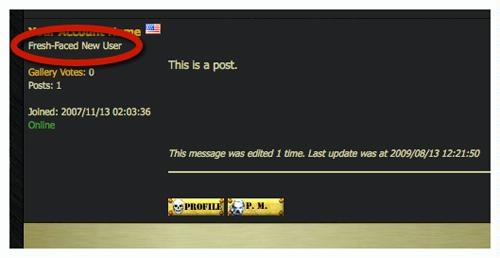
It is just a fun little bonus that gives a quick snapshot of how 'experienced' you are on the forums based on the number of posts you've made. The more posts you've made, the higher your rank will become.
There are a number of different army specific 'rank tracks' available for you to choose from and exactly how many posts are required to reach the different ranks in each track is a secret and varies from one rank track to another. We keep these rank levels a secret because we don't want users making posts simply to try to reach the next rank, they are intended to just be a fun little easter-egg. With that said, all the major posting milestones (100, 500, 1,000 posts, etc) tend to be a new rank level no matter what rank track you are on.
Jump back up to the list of Frequently Asked Questions.
|
|
This message was edited 3 times. Last update was at 2009/08/14 05:55:27
|
|
|
|
|
2009/08/14 03:19:31
Subject: Re:DAKKA DAKKA FAQ - Please read this thread before posting any questions
|
|
[ADMIN]
Decrepit Dakkanaut
|
Q: How do I delete one of my own posts?
A: For technical and moderation reasons users are not able to delete their own posts. If you wish to have one of your posts deleted simply click on the 'notify moderator' button on the right-hand side of the post you wish to have deleted:
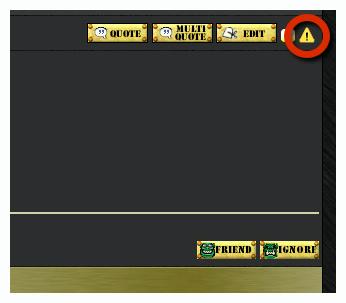
Make sure to include the reason why you'd like your post deleted into the 'notify moderator' description field.
Jump back up to the list of Frequently Asked Questions.
|
|
This message was edited 2 times. Last update was at 2009/08/14 05:55:36
|
|
|
|
|
2009/09/30 04:40:22
Subject: Re:DAKKA DAKKA FAQ - Please read this thread before posting any questions
|
|
[ADMIN]
Decrepit Dakkanaut
|
Q: What is 'thread necromancy' (aka 'threadromancy') and why is it bad?
A: Thread necromancy is posting in a thread that hasn't received any posts for a certain amount of time. Generally these threads have since moved off the front page of the forum and posting in them 'bumps' them back up to the front page.
It is considered poor forum etiquette because when a thread containing topical information is bumped back up to the front page of the forum it can be very confusing as to many users as it will seem like a brand new thread (if they don't look at the dates in the thread) but filled with now incorrect or outdated information. This often leads to further confused replies from other members and in general, not a very good reading experience for most. Beyond that, bumping a thread that most users are finished with back to the front page pushes all other current topic threads, that many more people are interested in, further down (or off) the first page of the forum.
Because of this, users are asked to refrain from posting in threads that have been dormant (haven't had any posts) for more than 3-4 weeks if the thread contains topical information at all. Topical information would include things like news, rumors, current events, and any discussion based on rules which are now obsolete (like outdated codices, for example). The only time it would be okay to post in one of these dormant threads would be to add vital new or missing information to the existing conversation. . .just posting your opinion on the topic would not qualify. Threads suffering from thread necromancy are typically locked by forum moderators in order to prevent further confusion being caused by the thread.
It is usually acceptable to post into dormant threads that aren't topical in nature, like modeling, painting, background discussion, etc, but if you are ever in doubt about whether it is appropriate to post in an older thread or not, please contact a moderator or administrator ahead of time to ask.
Also, to prevent unintended thread necromancy, please always check the dates on the forum posts you are replying to, especially when you've come across the post using the search function.
Jump back up to the list of Frequently Asked Questions.
|
|
This message was edited 4 times. Last update was at 2015/04/10 01:00:04
|
|
|
|
|
2009/10/08 16:31:43
Subject: Re:DAKKA DAKKA FAQ - Please read this thread before posting any questions
|
|
[ADMIN]
Decrepit Dakkanaut
|
Q: How Do I get my images from the Dakka gallery into my forum posts?
A: First you need to upload your images to the Dakka gallery. Click here to do so and follow the instructions provided on that page.
Once your images have finished uploading into the gallery, open the page of the picture you want to insert into your forum post. Scroll down that page and find the 'Share This Image' section of the page in the bottom right corner.
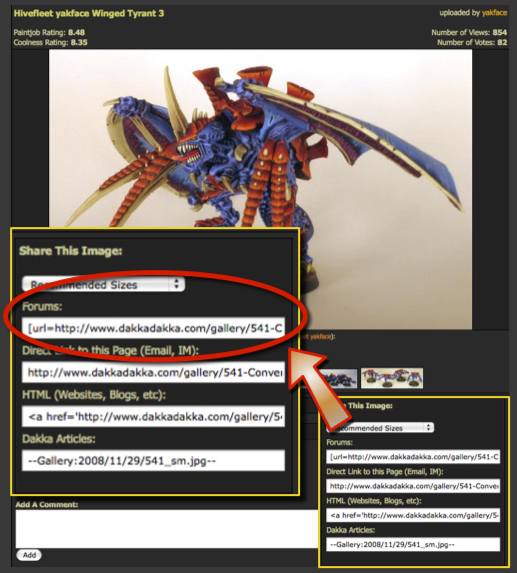
Copy the ENTIRE code from the 'Forums' field and paste it directly into your forum post (there's no need to add any additional tags or anything else), and that's it. . .you should now see the picture in your forum post!
If you're putting the image on another website that doesn't use 'UBB' code ('UBB' is a common code used by most, but not all forums, to post pictures), you can instead copy-and-paste the 'HTML' code provided in the field titled 'HTML'.
By default, the gallery will automatically re-size your image to a 'medium' size (up to 600 pixels wide), but you can choose what size you want displayed in your forum post if you want.
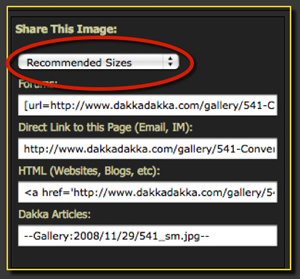
BEFORE copying the code out of the 'Forums' field, click on the 'Recommended Sizes' drop down menu and choose what size you'd like your image to display in your forum post. Making this selection simply changes the code provided to you in the 'Forums' field so you won't see any visible difference until you actually submit your post.
Please remember that all pictures uploaded to the Dakka gallery must be wargaming related and may not contain graphic or copyrighted images. Please remember this is a family-friendly site. If you are ever in doubt, please contact one of the site moderators or administrators for clarification on whether your picture is acceptable or not. Improper gallery images will be deleted without warning and may result in a suspension of your account.
Jump back up to the list of Frequently Asked Questions.
|
|
This message was edited 3 times. Last update was at 2009/10/08 16:56:02
|
|
|
|
|
2009/10/13 03:47:53
Subject: Re:DAKKA DAKKA FAQ - Please read this thread before posting any questions
|
|
[ADMIN]
Decrepit Dakkanaut
|
Q: Can I change my user name or delete my Dakka account and start over again?
A: Due to technical and moderation concerns, user accounts are never deleted (except for very extreme cases). If you believe that you are 'finished' using an account or no longer want to visit the site, simply stop logging into the account! The side benefit of this is also that if you ever decide you do want to visit the site again or use that account again, no additional work is required. . .you can just sign right back in and pick up where you left off.
This also prevents a user from creating multiple accounts using only a single email address. We like you to choose one profile and stick with it as much as possible when on the site.
Please note that it IS possible for the name on a user account to be changed, but this is something reserved for extreme cases, and will not be done on a regular basis as your fancy changes.
If you feel as though you have a legitimate reason as to why your account name should be changed, please contact a moderator or administrator to have it changed.
Jump back up to the list of Frequently Asked Questions.
|
|
|
|
|
2010/12/04 04:18:23
Subject: Re:DAKKA DAKKA FAQ - Please read this thread before posting any questions
|
|
[ADMIN]
Decrepit Dakkanaut
|
Q: How do I notify a moderator about a particular post?
A: If you wish to notify a moderator about a particular post for any reason (it is insulting, contains unfiltered swearing, etc) simply click on the 'alert a moderator' button on the right-hand side of the post you wish to have a moderator examine:
Make sure to include the reason why you believe the post needs to be examined by a moderator in the 'alert a moderator - reason' description field.
A moderator will eventually examine the post in question and make a judgement call on whether any action needs to be taken. For example, in some cases the moderator may disagree with your assessment and decide that the post is indeed acceptable to remain as-is. Also, please be aware that much of the disciplinary action taken on Dakka is done so via Personal Message so do not assume that because you do not see any immediate action that none has been taken.
Finally, if you wish to notify a moderator about a whole thread (as opposed to just one post in a thread), simply click the 'alert a moderator' button on any post in the thread and in the 'reason' field explain what you think needs to happen with the thread (such as suggesting it should be moved to another forum, for example).
Jump back up to the list of Frequently Asked Questions.
|
|
This message was edited 1 time. Last update was at 2010/12/04 04:20:35
|
|
|
|
|
2012/02/22 20:52:30
Subject: DAKKA DAKKA FAQ - Please read this thread before posting any questions
|
|
Stubborn Eternal Guard
|
what does the exalt button do?
|
|
|
|
|
|
2012/02/22 21:26:04
Subject: DAKKA DAKKA FAQ - Please read this thread before posting any questions
|
|

Lady of the Lake
|
It's a like button of sorts. On the individual posts by the friend section it's more behind the scenes, but for the thread one up at the top and bottom of the page it'll also add the thread to your exalted list (in thread tools) so you can find them again.
|
|
|
|
|
|
2012/09/04 00:10:50
Subject: Re:DAKKA DAKKA FAQ - Please read this thread before posting any questions
|
|

Dutiful Citizen Levy
|
I was wondering how to attach a picture into a private message from your computer. I know in a forum post you can click the attachments button however I can't seem to find one in the PM creator.
Thanks
|
|
|
|
|
2012/09/04 00:21:25
Subject: DAKKA DAKKA FAQ - Please read this thread before posting any questions
|
|
Dakka Veteran
North East (Erie), PA, USA
|
You can always upload it to your gallery here on dakka and then use the picture buttons and then side click the photo and copy/paste the link for the photo in between the picture tabs.
|
40K:
The Purge 
Vracksian Renegades 
WAAAAAGH Scrappa Death Skullz  |
|
|
|
|
2012/11/10 02:12:57
Subject: Re:DAKKA DAKKA FAQ - Please read this thread before posting any questions
|
|

Fresh-Faced New User
|
Hi from the black nid. On the subject of adding an avatar, those instructions are from before the site was updated, so how do you add one now? Also, how do you actualy start your own thred or forum?
|
|
This message was edited 1 time. Last update was at 2012/11/10 02:26:42
|
|
|
|
|
2014/03/04 12:02:16
Subject: Re:DAKKA DAKKA FAQ - Please read this thread before posting any questions
|
|
Longtime Dakkanaut
|
I have 2 x WIP blogs , is it possible to combine the two together into one "general hobby" WIP ?
|
|
|
|
|
|
|
|